
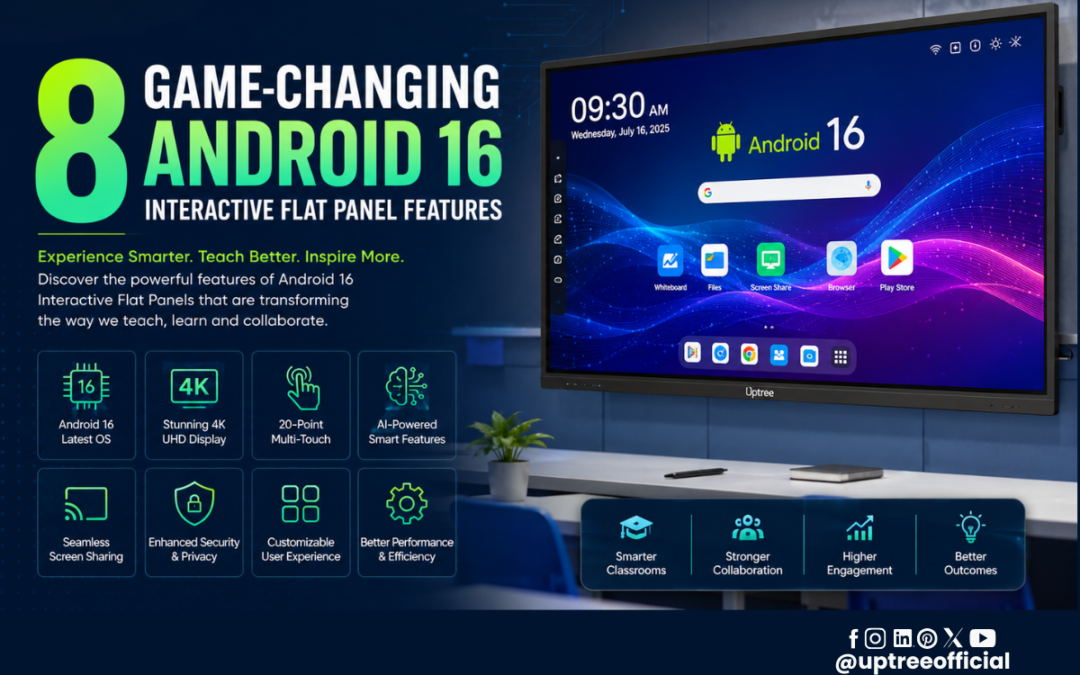
8 Game-Changing Android 16 Interactive Flat Panel Features
8 Game-Changing Android 16 Interactive Flat Panel Features are transforming the way teachers educate, students learn, and organizations collaborate. As classrooms and meeting rooms continue to embrace digital technology, choosing the right interactive display has become more important than ever. With Android 16, interactive flat panels are now smarter, faster, and more intuitive, offering AI-powered tools, seamless multitasking, enhanced security, and a superior user experience.
At Uptree, we believe that technology should simplify teaching and collaboration rather than complicate it. Our Android 16 Interactive Flat Panels are designed to help educational institutions, training centers, coaching institutes, and businesses create engaging, productive, and future-ready environments. In this blog, we will explore 8 Game-Changing Android 16 Interactive Flat Panel Features that make this latest generation of smart panels a valuable investment.
Why Upgrade to an Android 16 Interactive Flat Panel?
Technology in education is evolving rapidly. Traditional whiteboards and projectors are no longer sufficient for modern classrooms where collaboration, multimedia learning, and real-time interaction are essential. Android 16 introduces significant improvements that enhance performance, security, multitasking, and AI integration.
These advancements enable teachers to deliver interactive lessons with ease while giving students a more engaging learning experience. Businesses also benefit from smoother presentations, faster collaboration, and improved productivity.
The 8 Game-Changing Android 16 Interactive Flat Panel Features discussed in this article demonstrate how Android 16 is setting a new benchmark for smart learning and professional collaboration.
1. AI-Powered Smart Classroom Experience
The first among the 8 Game-Changing Android 16 Interactive Flat Panel Features is its intelligent AI integration.
Artificial Intelligence is changing the way interactive displays function. Instead of being just a digital whiteboard, the Android 16 Interactive Flat Panel becomes an intelligent teaching assistant capable of improving efficiency and classroom engagement.
Some AI-powered capabilities include:
- Smart handwriting recognition
- Intelligent shape correction
- Faster object recognition
- AI-assisted classroom tools
- Improved voice interaction
- Enhanced content organization
Teachers can write naturally on the board while the panel automatically improves handwriting clarity and recognizes shapes with precision. This saves valuable classroom time and creates more professional-looking lesson content.
AI also helps educators quickly organize notes, making it easier to revisit important concepts during or after class.
For businesses, AI enhances brainstorming sessions by making annotations more accurate and presentations more interactive.
2. Lightning-Fast Performance with Android 16
Another highlight of the 8 Game-Changing Android 16 Interactive Flat Panel Features is the remarkable performance improvement.
Android 16 has been optimized to deliver:
- Faster boot times
- Smooth application switching
- Reduced system lag
- Better memory management
- Improved graphics rendering
These enhancements ensure that teachers no longer waste valuable classroom time waiting for applications to load.
Whether you’re opening educational software, switching between presentations, accessing cloud storage, or using digital whiteboard tools, everything feels responsive and fluid.
For schools conducting back-to-back classes, this improved performance significantly enhances the teaching experience.
Businesses conducting client meetings also benefit from quick presentation loading and seamless multitasking.
3. Advanced Multi-Window Multitasking
One of the most practical 8 Game-Changing Android 16 Interactive Flat Panel Features is its improved multitasking capability.
Modern teaching requires multiple resources at the same time.
For example, a teacher may need to:
- Display a PDF textbook
- Open a whiteboard
- Play an educational video
- Access a web browser
- View student assignments
Instead of constantly switching between applications, Android 16 allows multiple windows to run simultaneously.
This enables educators to compare content side by side, explain concepts more effectively, and keep students engaged throughout the lesson.
Corporate teams also benefit by viewing spreadsheets, presentations, video conferences, and notes simultaneously during meetings.
The result is a smoother workflow and improved productivity.
Why Choose Uptree?
At Uptree, we focus on delivering interactive technology that supports both education and business. Our Android 16 Interactive Flat Panels combine powerful hardware with intelligent software to create an engaging and efficient user experience.
Every Uptree Interactive Flat Panel is designed to provide:
- Stunning 4K Ultra HD display
- Responsive multi-touch technology
- Smooth Android 16 performance
- AI-powered smart features
- Durable design for long-term use
- Easy integration with classrooms and meeting rooms
These innovations ensure that educators and professionals can focus on collaboration rather than technology.
In the next section, we’ll explore the remaining 8 Game-Changing Android 16 Interactive Flat Panel Features, including enhanced security, wireless screen sharing, advanced annotation tools, eye-care technology, and seamless cloud connectivity that make Android 16 the ideal choice for modern digital learning and collaboration.
4. Seamless Wireless Screen Sharing
The fourth highlight in the 8 Game-Changing Android 16 Interactive Flat Panel Features is effortless wireless screen sharing. In today’s classrooms and meeting rooms, users expect to connect their devices instantly without relying on cables or complicated setups.
With Android 16, teachers and presenters can wirelessly share content from laptops, smartphones, tablets, and other compatible devices in just a few steps. This makes presentations smoother and encourages active participation from everyone in the room.
Some key benefits include:
- Instant wireless casting
- Multi-device screen sharing
- High-quality image transmission
- Minimal connection delays
- Easy collaboration for teachers and students
Imagine a science teacher displaying a live experiment from a tablet while simultaneously annotating the content on the interactive flat panel. Similarly, students can present projects directly from their devices without interrupting the flow of the lesson.
Businesses can also conduct collaborative meetings where multiple team members contribute ideas from different devices. These capabilities make wireless connectivity one of the most valuable 8 Game-Changing Android 16 Interactive Flat Panel Features available today.
5. Advanced Interactive Whiteboard Tools
No interactive display is complete without a powerful whiteboard, and this is one of the most practical 8 Game-Changing Android 16 Interactive Flat Panel Features.
The Android 16 Interactive Flat Panel includes an intelligent whiteboard designed to simplify teaching and brainstorming. Instead of writing on a traditional board, educators can create visually engaging lessons with digital tools that improve understanding.
Common whiteboard features include:
- Multiple pen styles and colors
- Highlighter tools
- Shape recognition
- Eraser with gesture support
- Infinite writing canvas
- Image insertion
- Mathematical drawing tools
- Save and export notes
- QR code sharing
Teachers can explain complex mathematical formulas, science diagrams, maps, engineering concepts, and business strategies more effectively using these built-in tools.
Students also benefit because notes can be saved and shared instantly, ensuring no important information is lost after the class ends.
These advanced whiteboard capabilities clearly demonstrate why the 8 Game-Changing Android 16 Interactive Flat Panel Features are redefining digital education.
6. Enhanced Security and Privacy
Security has become an essential requirement for educational institutions and businesses. One of the most important 8 Game-Changing Android 16 Interactive Flat Panel Features is its improved security framework.
Android 16 introduces multiple layers of protection to help safeguard sensitive information and user data.
Some important security improvements include:
- Better application permissions
- Enhanced system protection
- Secure user authentication
- Regular security updates
- Improved privacy controls
Schools often store lesson plans, examination materials, student records, and digital learning resources on their interactive displays. Businesses frequently access confidential presentations, financial reports, and client information.
With Android 16, administrators have greater control over user access, helping ensure that only authorized individuals can use specific applications or settings.
At Uptree, we understand the importance of secure digital learning environments. Our Android 16 Interactive Flat Panels are designed to provide both performance and peace of mind.
Why Android 16 is Ideal for Future-Ready Classrooms
Educational technology continues to evolve, and institutions need solutions that remain relevant for years to come. The 8 Game-Changing Android 16 Interactive Flat Panel Features make Android 16 a future-ready platform capable of supporting changing teaching methods and learning styles.
Teachers can integrate multimedia lessons, online resources, interactive quizzes, educational apps, and collaborative activities without switching between multiple devices.
Students enjoy a more immersive learning experience through visual demonstrations, interactive exercises, and real-time participation.
Some long-term advantages include:
- Better classroom engagement
- Improved student participation
- Faster lesson delivery
- Simplified classroom management
- Reduced dependence on printed materials
- Greater collaboration between teachers and students
These benefits make Android 16 Interactive Flat Panels an excellent investment for schools, colleges, universities, coaching institutes, training centers, and corporate learning environments.
In the final section, we’ll cover the last two of the 8 Game-Changing Android 16 Interactive Flat Panel Features, along with a conclusion explaining why Uptree’s Android 16 Interactive Flat Panel is the smart choice for modern education and professional collaboration.
7. Eye-Care Technology for Comfortable Viewing
The seventh highlight among the 8 Game-Changing Android 16 Interactive Flat Panel Features is its advanced eye-care technology. Teachers and students often spend several hours in front of digital screens every day. A display that minimizes eye strain can significantly improve comfort and concentration during long learning sessions.
Android 16 Interactive Flat Panels are designed with display technologies that enhance visual comfort without compromising image quality.
Key eye-care features include:
- Anti-glare display for better visibility
- Low blue light technology
- Flicker-free viewing experience
- Crisp 4K Ultra HD resolution
- Wide viewing angles for every student
These features help create a healthier digital learning environment. Whether students are seated at the front or back of the classroom, they can clearly view presentations, diagrams, videos, and annotations without discomfort.
For corporate environments, eye-care technology ensures employees can participate in lengthy meetings and training sessions with reduced visual fatigue. This makes eye protection one of the most practical 8 Game-Changing Android 16 Interactive Flat Panel Features for everyday use.
8. Cloud Connectivity and Smart Collaboration
The final addition to the 8 Game-Changing Android 16 Interactive Flat Panel Features is seamless cloud connectivity. Modern education and business rely heavily on cloud-based platforms for storing, sharing, and accessing information from anywhere.
Android 16 makes cloud integration faster and more reliable, allowing users to access files instantly without depending on external storage devices.
Benefits include:
- Quick access to cloud storage
- Easy file synchronization
- Instant document sharing
- Secure online collaboration
- Access to presentations from anywhere
- Simplified team communication
Teachers can prepare lessons at home, save them to the cloud, and continue teaching in the classroom without transferring files manually. Likewise, students can receive notes, assignments, and learning materials instantly.
Business teams can collaborate on presentations, reports, and project documents in real time, ensuring everyone stays updated with the latest information.
These capabilities complete the 8 Game-Changing Android 16 Interactive Flat Panel Features, making Android 16 a comprehensive solution for modern collaboration.
Why Choose Uptree Android 16 Interactive Flat Panel?
At Uptree, we are committed to delivering advanced technology that empowers educators, institutions, and businesses. Our Android 16 Interactive Flat Panels combine intelligent software with premium hardware to create a seamless teaching and collaboration experience.
When you choose Uptree, you benefit from:
- Android 16 operating system
- Brilliant 4K Ultra HD display
- Responsive multi-touch technology
- AI-powered interactive tools
- Smooth wireless screen sharing
- Powerful whiteboard software
- Eye-care display technology
- Durable build quality
- Easy installation and user-friendly interface
- Reliable after-sales support
Our solutions are suitable for:
- Schools
- Colleges
- Universities
- Coaching institutes
- Corporate offices
- Training centers
- Conference rooms
- Government organizations
Every Uptree Interactive Flat Panel is built to meet the evolving needs of digital education and professional collaboration.
Conclusion
The 8 Game-Changing Android 16 Interactive Flat Panel Features showcase how modern technology is transforming classrooms and workplaces. From AI-powered teaching tools and lightning-fast performance to wireless screen sharing, advanced whiteboard capabilities, enhanced security, eye-care technology, and cloud connectivity, Android 16 delivers everything needed for a smarter and more engaging experience.
Investing in an Android 16 Interactive Flat Panel is more than upgrading your display—it is investing in better learning outcomes, improved collaboration, and long-term productivity. As educational institutions and businesses continue to embrace digital transformation, choosing the right interactive solution becomes increasingly important.
At Uptree, we are proud to provide innovative Android 16 Interactive Flat Panels that combine cutting-edge features with dependable performance. Whether you are planning a smart classroom, a digital training center, or a modern conference room, Uptree has the right solution to help you achieve your goals.
If you’re ready to experience the future of interactive learning and collaboration, explore Uptree’s Android 16 Interactive Flat Panels and discover how these 8 Game-Changing Android 16 Interactive Flat Panel Features can transform your teaching, presentations, and teamwork.
Frequently Asked Questions (FAQs)
1. What are the biggest advantages of an Android 16 Interactive Flat Panel?
Android 16 Interactive Flat Panels offer AI-powered tools, faster performance, seamless wireless screen sharing, enhanced security, advanced whiteboard features, cloud connectivity, and a smooth user experience for education and business.
2. Are Android 16 Interactive Flat Panels suitable for schools?
Yes. They are ideal for schools, colleges, universities, coaching institutes, and training centers because they make lessons more interactive, engaging, and collaborative.
3. Can multiple users write on the Interactive Flat Panel simultaneously?
Yes. Most Android 16 Interactive Flat Panels support multi-touch functionality, allowing multiple users to write, draw, annotate, and interact on the screen at the same time.
4. Why should I choose Uptree Android 16 Interactive Flat Panels?
Uptree offers premium-quality Interactive Flat Panels with Android 16, AI-powered features, 4K UHD display, responsive touch technology, reliable performance, and dedicated customer support for educational and professional environments.
Final Thoughts
As technology continues to evolve, educational institutions and businesses need solutions that are intelligent, reliable, and future-ready. The 8 Game-Changing Android 16 Interactive Flat Panel Features discussed in this blog highlight how Android 16 is setting a new standard for digital collaboration and interactive learning. From AI-powered capabilities to enhanced security and seamless cloud connectivity, every feature is designed to improve productivity and engagement.
Unlike traditional projectors or whiteboards, an Android 16 Interactive Flat Panel offers an all-in-one solution that combines presentation, collaboration, annotation, and multimedia capabilities into a single device. This reduces the need for multiple tools while creating a cleaner, smarter, and more efficient learning environment.
At Uptree, we continuously innovate to provide advanced interactive technology that meets the demands of modern classrooms and workplaces. Our Android 16 Interactive Flat Panels are built with premium hardware, intuitive software, and intelligent features that help educators teach with confidence and organizations collaborate effectively.
Whether you are upgrading an existing classroom or building a new smart learning environment, the 8 Game-Changing Android 16 Interactive Flat Panel Features make Android 16 the ideal choice for long-term success.
Why Schools and Businesses Trust Uptree
Thousands of educators and professionals are embracing digital transformation, and Uptree is proud to be a trusted technology partner. We focus on delivering solutions that are easy to use, highly reliable, and backed by dedicated customer support.
What Makes Uptree Different?
- Android 16-powered Interactive Flat Panels
- AI-enabled teaching and collaboration tools
- Crystal-clear 4K UHD display
- Ultra-responsive multi-touch technology
- Built-in whiteboard and annotation software
- Seamless wireless screen sharing
- Durable, premium-quality design
- Professional installation and training
- Dedicated after-sales support
- Solutions for the education and corporate sectors
With Uptree, you’re not just purchasing an interactive display; you’re investing in a smarter way to teach, learn, and collaborate.
Ready to Upgrade Your Classroom?
If you’re looking for a next-generation teaching solution, now is the perfect time to experience the 8 Game-Changing Android 16 Interactive Flat Panel Features. These innovative capabilities help educators create engaging lessons, enable students to participate actively, and allow businesses to collaborate more efficiently.
Explore the latest Android 16 Interactive Flat Panels from Uptree and discover how they can transform your classroom, training center, or meeting room into a truly interactive digital space.
Contact Uptree today to schedule a product demonstration or learn more about our complete range of smart classroom and collaboration solutions.
If you’re planning to upgrade your classrooms or training spaces, Uptree is your trusted partner. Our Android 16 Interactive Flat Panels combine advanced AI capabilities with premium performance to create an engaging, future-ready learning environment.
To learn more about the Uptree Interactive Flat Panel, explore our related blogs:
-
Top 5 Benefits of Android 16 Interactive Flat Panel: Read More
-
Android 16 Interactive Flat Panel for Modern Classrooms: Read More
-
Key Advantages of EDLA-Certified Android 16 IFP: Read More