
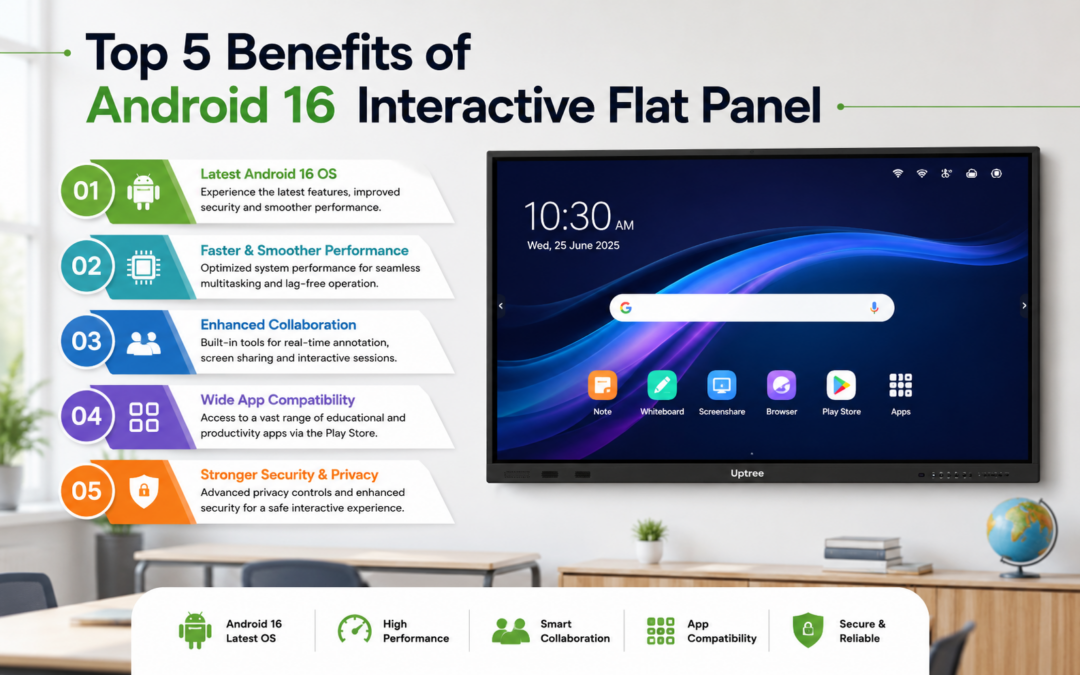
Top 5 Benefits of Android 16 Interactive Flat Panel
Top 5 Benefits of Android 16 Interactive Flat Panel is a topic that is gaining significant attention among schools, colleges, coaching institutes, and training centers. As classrooms become more digital, educators are searching for smart solutions that improve teaching, increase student engagement, and make learning more interactive. An Android 16 Interactive Flat Panel is one of the most effective tools for modern education, offering a powerful combination of touch technology, Android performance, and collaboration features.
At Uptree, we believe that technology should make learning easier, smarter, and more engaging. Our Android 16 Interactive Flat Panels are designed specifically for educational environments, helping teachers deliver dynamic lessons while enabling students to participate actively in the learning process.
In this blog, we will explore the Top 5 Benefits of Android 16 Interactive Flat Panel and explain why educational institutions are rapidly adopting this technology.
What Is an Android 16 Interactive Flat Panel?
An Android 16 Interactive Flat Panel is a large touch-enabled display that combines the functionality of a smart TV, digital whiteboard, computer, and collaboration tool into a single device. It runs on the Android 16 operating system, providing a smooth, fast, and user-friendly experience.
Teachers can write, draw, present videos, access educational apps, browse the internet, and collaborate with students directly on the screen. This makes the Android 16 Interactive Flat Panel an ideal solution for modern classrooms.

1. Enhanced Student Engagement
Interactive Learning Experience
The first and most important point in the Top 5 Benefits of Android 16 Interactive Flat Panel is improved student engagement.
Traditional teaching methods often rely heavily on lectures and static presentations. In contrast, an Android 16 Interactive Flat Panel allows students to interact directly with the content. Teachers can:
-
Conduct live quizzes
-
Use drag-and-drop activities
-
Annotate diagrams and charts
-
Play educational videos
-
Invite students to solve problems on the screen
When students participate actively, they retain information better and stay focused for longer periods.
Why It Matters
Research consistently shows that interactive learning improves attention, participation, and academic performance. This is one of the strongest reasons schools are investing in Android 16 Interactive Flat Panel technology.
2. Smarter Teaching with Android 16
Faster and More Powerful Performance
The second major advantage in the Top 5 Benefits of Android 16 Interactive Flat Panel is the power of the Android 16 operating system.
Compared to older systems, Android 16 offers:
-
Faster app launching
-
Smoother multitasking
-
Better security
-
Improved memory management
-
Enhanced compatibility with educational apps
Teachers can switch between presentations, whiteboard tools, videos, and web browsers without interruptions.
Access to Educational Apps
An Android 16 Interactive Flat Panel supports a wide range of educational applications, including learning management systems, video conferencing platforms, and subject-specific teaching tools. This helps educators create richer and more effective lessons.
3. Better Collaboration in the Classroom
Multi-Touch Functionality
The third point in the Top 5 Benefits of Android 16 Interactive Flat Panel is improved collaboration.
Most modern Android 16 Interactive Flat Panel models support multiple touch points, allowing several students to interact with the screen at the same time. This encourages:
-
Group activities
-
Team problem-solving
-
Brainstorming sessions
-
Collaborative projects
-
Interactive classroom discussions
Wireless Screen Sharing
Students and teachers can share content from laptops, tablets, and smartphones directly to the panel. This makes classroom collaboration seamless and efficient.
At Uptree, our Android 16 Interactive Flat Panel solutions are designed to support modern collaborative learning environments.
4. Time and Cost Efficiency
All-in-One Teaching Solution
The fourth benefit in the Top 5 Benefits of Android 16 Interactive Flat Panel is cost and time savings.
Instead of purchasing separate projectors, whiteboards, speakers, and computers, schools can use a single Android 16 Interactive Flat Panel for all these functions.
Benefits for Institutions
-
Reduced equipment costs
-
Lower maintenance requirements
-
Less classroom setup time
-
Fewer technical issues
-
Longer product lifespan
Instant Lesson Access
Teachers can save lessons, notes, and annotations directly on the panel or in cloud storage. This eliminates the need to rewrite content repeatedly and saves valuable teaching time.
5. Future-Ready Digital Education
Supports Hybrid and Online Learning
The final point in the Top 5 Benefits of Android 16 Interactive Flat Panel is future readiness.
Education is no longer limited to physical classrooms. An Android 16 Interactive Flat Panel supports hybrid learning by integrating with video conferencing platforms such as Zoom, Google Meet, and Microsoft Teams.
Teachers can:
-
Teach in-person and remote students simultaneously
-
Share screen content live
-
Record lessons
-
Conduct virtual discussions
-
Manage digital classrooms efficiently
Preparing Students for the Digital World
Using an Android 16 Interactive Flat Panel helps students become comfortable with digital tools, collaboration technologies, and interactive learning methods that are increasingly important in higher education and the workplace.
Additional Advantages of Android 16 Interactive Flat Panel
Superior Display Quality
Beyond the Top 5 Benefits of Android 16 Interactive Flat Panel, users also enjoy:
-
4K Ultra HD resolution
-
Vibrant colors
-
Wide viewing angles
-
Anti-glare screens
-
Comfortable viewing for long sessions
Easy-to-Use Interface
One reason educators love the Android 16 Interactive Flat Panel is its intuitive interface. Teachers can start using it with minimal training, making adoption faster and easier.
Why Choose Uptree Android 16 Interactive Flat Panel?
At Uptree, we focus on delivering reliable, education-focused technology solutions. Our Android 16 Interactive Flat Panel models are built to meet the needs of schools, colleges, coaching institutes, and training centers.
Key Features of Uptree Panels
-
Android 16 operating system
-
4K UHD display
-
Multi-touch support
-
Wireless casting
-
Built-in speakers
-
Cloud integration
-
Durable classroom-ready design
-
Easy software updates
By choosing Uptree Android 16 Interactive Flat Panel, institutions get a solution that is powerful, user-friendly, and future-ready.
Who Can Benefit from Android 16 Interactive Flat Panel?
The Android 16 Interactive Flat Panel is suitable for: 
-
Schools
-
Colleges
-
Universities
-
Coaching centers
-
Training institutes
-
Corporate training rooms
-
EdTech organizations
Whether teaching young students or conducting professional training, an Android 16 Interactive Flat Panel enhances communication and learning outcomes.
How Android 16 Interactive Flat Panel Improves Learning Outcomes
Educational institutions that adopt Android 16 Interactive Flat Panel technology often report:
-
Higher student participation
-
Better concept understanding
-
Improved collaboration
-
Increased teacher productivity
-
More engaging classroom experiences
-
Better retention of information
-
Enhanced digital literacy
These outcomes make the Android 16 Interactive Flat Panel a valuable investment for modern education.
Final Thoughts
The Top 5 Benefits of Android 16 Interactive Flat Panel clearly show why this technology is becoming essential for modern classrooms. From increasing student engagement and improving collaboration to supporting hybrid learning and reducing costs, an Android 16 Interactive Flat Panel offers significant advantages for educational institutions.
At Uptree, we are committed to helping schools and educators create smarter, more interactive learning environments. Our Uptree Android 16 Interactive Flat Panel solutions are designed to deliver powerful performance, easy usability, and long-term value.
If your institution is looking to upgrade classrooms with future-ready technology, an Android 16 Interactive Flat Panel is one of the best investments you can make for better teaching and better learning.
To learn more about the Uptree Interactive Flat Panel, explore our related blogs:
-
4 Reasons Uptree Interactive Flat Panel is Essential: Read More
-
Ultimate Smart Upgrade at St. Xavier’s Ahmedabad: Read More
-
Rai University IT Classroom Upgrade with Uptree: Read More