
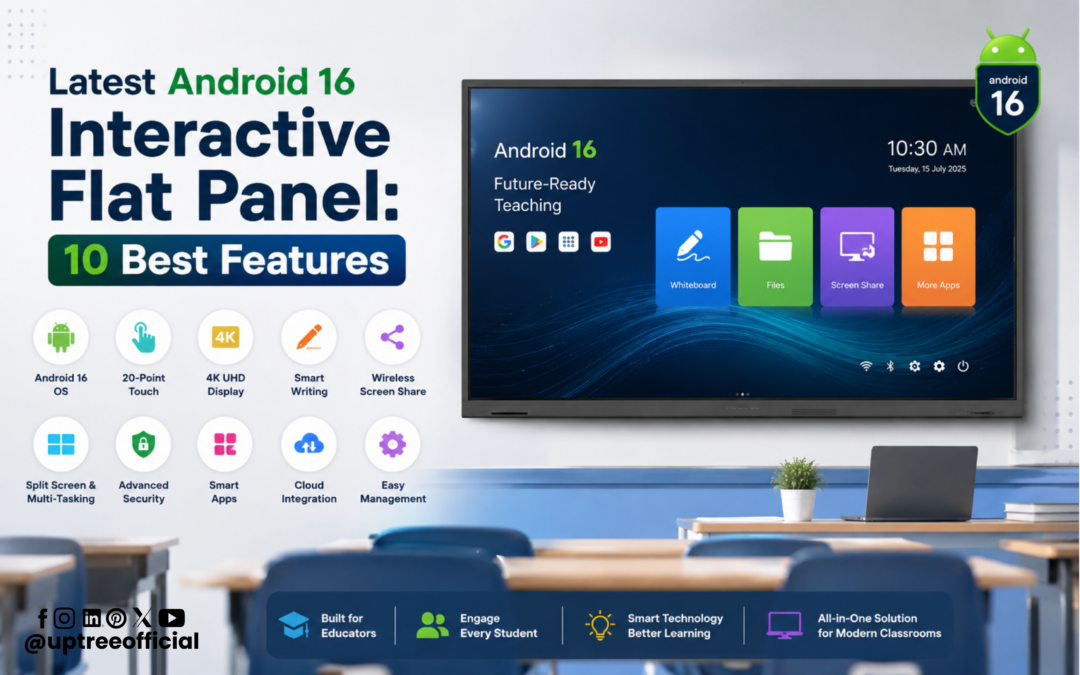
Latest Android 16 Interactive Flat Panel: 10 Best Features
Latest Android 16 Interactive Flat Panel: 10 Best Features is more than just a topic; it represents the future of interactive learning and collaboration. As educational institutions and businesses continue to adopt smart technologies, choosing the right interactive display has become essential. The Latest Android 16 Interactive Flat Panel: 10 Best Features combines cutting-edge hardware, intelligent AI capabilities, and a user-friendly interface to create a seamless teaching and presentation experience. If you are looking for the Latest Interactive Flat Panel, this new generation of Android 16-powered technology delivers exceptional speed, smarter tools, and unmatched performance.
At Uptree, we believe technology should make learning easier, presentations more engaging, and collaboration more productive. That is why our Latest Interactive Flat Panel is designed with advanced hardware and AI-powered software to meet the growing demands of schools, colleges, coaching institutes, corporate offices, and training centers.
The Latest Android 16 Interactive Flat Panel: 10 Best Features includes powerful hardware such as DDR5 RAM, an Octa-core processor, Android 16 operating system, Integrated AI, 8 GB RAM with 128 GB storage, HDMI Out support, In-built Device Management System (DMS), AI Image Search, Smart Write Tool, and immersive 3D Simulations. These features make teaching more interactive, learning more engaging, and business meetings more productive.
In this blog, Uptree explains the Latest Android 16 Interactive Flat Panel: 10 Best Features in detail and how these innovations can transform your classroom or workplace.
Why Choose the Latest Android 16 Interactive Flat Panel?
The education and business sectors have evolved significantly over the past few years. Traditional projectors and whiteboards are gradually being replaced by intelligent displays that provide better visuals, faster performance, and advanced collaboration features.
The Latest Android 16 Interactive Flat Panel: 10 Best Features is designed to meet these modern requirements. Whether you are teaching students, conducting employee training, or delivering client presentations, this Latest Interactive Flat Panel provides everything needed for an efficient and engaging experience.
Some key advantages include:
- Faster performance
- AI-powered productivity tools
- Smooth multitasking
- Large storage capacity
- High-speed memory
- Better connectivity
- Advanced classroom software
- Interactive 3D learning
- Future-ready Android platform
Let’s explore each feature in detail.
1. DDR5 RAM for Lightning-Fast Performance
One of the standout highlights of the Latest Android 16 Interactive Flat Panel: 10 Best Features is its advanced DDR5 RAM.
DDR5 is the newest generation of memory technology and offers a significant improvement over older DDR4 memory. It delivers higher bandwidth, faster processing speeds, and better power efficiency.
With DDR5 RAM, teachers can:
- Open multiple educational applications simultaneously.
- Switch between presentations without delay.
- Run high-resolution educational videos smoothly.
- Use whiteboard software while browsing the internet.
- Conduct online classes without performance issues.
Businesses also benefit from smoother presentations, faster document access, and efficient video conferencing.
Because of its enhanced memory architecture, the Latest Interactive Flat Panel handles multitasking effortlessly, making every lesson and meeting more productive.
Whether you are teaching complex science concepts or conducting boardroom discussions, DDR5 RAM ensures that the display remains responsive throughout the session.
2. Powerful Octa-Core Processor
Processing power plays a major role in determining the performance of any smart display.
The Latest Android 16 Interactive Flat Panel: 10 Best Features is powered by a high-performance Octa-core processor, enabling lightning-fast responsiveness and seamless multitasking.
Instead of waiting for applications to load, users experience instant performance while switching between educational tools, annotation software, AI features, and multimedia content.
Benefits of the Octa-core processor include:
- Faster app launching
- Smooth 4K video playback
- Responsive touch performance
- Better multitasking
- Faster AI processing
- Efficient classroom management
- Reduced lag during presentations
The combination of DDR5 RAM and an Octa-core processor makes the Latest Interactive Flat Panel one of the fastest interactive displays available for modern education.
Schools can conduct uninterrupted classes, while businesses can confidently run presentations without technical interruptions.
At Uptree, we understand that speed directly impacts productivity, and that is why our Android 16 Interactive Flat Panel is engineered for high performance.
3. Android 16 Operating System
Another reason why the Latest Android 16 Interactive Flat Panel: 10 Best Features stands out is its advanced Android 16 operating system.
Android 16 introduces several improvements that enhance both performance and usability. Users enjoy a modern interface, better security, faster app execution, and improved compatibility with educational and business applications.
Key benefits include:
Better User Experience
Android 16 offers an intuitive interface that is easy for teachers, students, and professionals to use.
Faster Application Performance
Applications open quickly and run smoothly without unnecessary delays.
Enhanced Security
Modern security updates help protect institutional data and user information.
Improved Stability
The operating system is optimized for continuous usage, ensuring reliable performance during long classroom sessions or meetings.
Better Compatibility
The Latest Interactive Flat Panel supports a wide range of educational apps, productivity software, cloud services, and collaboration platforms.
These improvements make Android 16 an ideal operating system for digital classrooms and professional workspaces.
4. Integrated AI for Smarter Teaching and Collaboration
Artificial Intelligence is transforming the way we teach, learn, and work. One of the biggest highlights of the Latest Android 16 Interactive Flat Panel: 10 Best Features is its Integrated AI, which helps users perform tasks more efficiently while creating an engaging learning environment.
The AI capabilities are designed to simplify classroom activities, improve productivity, and enhance collaboration. Whether you’re teaching a complex lesson or leading a corporate presentation, AI-powered tools help save time and deliver better results.
Benefits of Integrated AI
- Faster access to teaching resources
- Intelligent content assistance
- Improved classroom engagement
- Enhanced collaboration during meetings
- Better productivity for educators and professionals
- Smarter lesson preparation
Teachers can spend less time searching for resources and more time interacting with students. Likewise, business professionals can create more impactful presentations with AI-assisted tools.
The Latest Android 16 Interactive Flat Panel: 10 Best Features ensures that AI becomes a practical assistant rather than just an additional feature. This makes the Latest Interactive Flat Panel an excellent investment for institutions that want to embrace modern technology.
5. 8 GB RAM and 128 GB Storage for Smooth Multitasking
Performance is not only about processing power; it also depends on memory and storage. The Latest Android 16 Interactive Flat Panel: 10 Best Features includes 8 GB RAM and 128 GB internal storage, providing the speed and capacity needed for today’s digital classrooms and workplaces.
With 8 GB RAM, users can comfortably run multiple applications at the same time without experiencing lag. The 128 GB storage allows schools and organizations to keep presentations, videos, teaching materials, PDFs, and other important files directly on the device.
Advantages of 8 GB RAM
- Smooth multitasking
- Faster app switching
- Better touch responsiveness
- Reliable performance during online classes
- Seamless operation of AI-powered features
Benefits of 128 GB Storage
- Store thousands of educational resources
- Save presentations and meeting files
- Keep multimedia content ready for instant access
- Reduce dependence on external storage devices
- Organize documents efficiently
Teachers no longer need to worry about deleting files to free up space, while businesses can securely store important meeting materials.
This combination of memory and storage makes the Latest Interactive Flat Panel suitable for continuous daily use in schools, universities, coaching centers, and corporate offices.
6. HDMI Out Support for Expanded Display Options
Connectivity is a crucial requirement for modern classrooms and conference rooms. That is why one of the standout features in the Latest Android 16 Interactive Flat Panel: 10 Best Features is HDMI Out Support.
Unlike standard displays that only accept HDMI input, HDMI Out allows users to mirror or extend the screen to another display. This is particularly useful in large classrooms, auditoriums, seminar halls, and boardrooms where every participant needs a clear view.
Benefits of HDMI Out Support
- Connect to external monitors or projectors
- Display content on large LED screens
- Improve visibility in large classrooms
- Support hybrid teaching environments
- Enhance presentations during seminars and conferences
For educational institutions, HDMI Out ensures that students sitting at the back of the classroom can clearly view the lesson. In business settings, presenters can display content on multiple screens for larger audiences.
With this feature, the Latest Interactive Flat Panel becomes a versatile solution for both teaching and professional collaboration.
7. In-built DMS for Easy Device Management
Managing multiple interactive displays across an institution can be challenging. To solve this problem, the Latest Android 16 Interactive Flat Panel: 10 Best Features includes an In-built Device Management System (DMS).
The DMS enables administrators to monitor, configure, and manage multiple interactive flat panels from a centralized platform. This saves time, reduces maintenance efforts, and ensures that all devices remain updated.
Key Features of In-built DMS
- Remote device monitoring
- Software update management
- Centralized device control
- Easy deployment across multiple classrooms
- Improved security management
- Reduced maintenance costs
For schools with several classrooms, the Device Management System allows the IT team to monitor all interactive panels without visiting each room individually.
Corporate organizations also benefit by managing displays across meeting rooms and training centers with greater efficiency.
The Latest Android 16 Interactive Flat Panel: 10 Best Features helps institutions save valuable time while maintaining consistent performance across every device.
Why These Features Matter
Modern education is becoming increasingly digital, and institutions require technology that supports collaboration, creativity, and efficiency. The Latest Android 16 Interactive Flat Panel: 10 Best Features addresses these needs by combining intelligent software with powerful hardware.
The Latest Interactive Flat Panel is not just a display; it is a complete teaching and collaboration solution. Integrated AI helps simplify tasks, 8 GB RAM and 128 GB storage ensure smooth performance, HDMI Out expands connectivity, and the In-built DMS makes large-scale device management effortless.
At Uptree, we understand the evolving needs of educators and businesses. That’s why our solutions are designed to provide reliability, speed, and innovation in every classroom and meeting room.
Whether you’re conducting online classes, delivering interactive lessons, organizing training sessions, or presenting business strategies, the Latest Android 16 Interactive Flat Panel: 10 Best Features offers the tools you need to work smarter and achieve better outcomes.
How Uptree Makes a Difference
At Uptree, we focus on delivering technology that improves teaching, learning, and collaboration. Every Latest Android 16 Interactive Flat Panel: 10 Best Features is designed to provide a reliable and future-ready experience for educational institutions and businesses.
From powerful hardware to AI-driven software, Uptree combines innovation with ease of use. Our solutions help educators create engaging lessons, enable students to participate actively, and allow organizations to conduct smarter meetings and training sessions.
The Latest Interactive Flat Panel from Uptree is built to meet the needs of modern classrooms by offering speed, intelligence, and seamless collaboration in one advanced display.
Explore the Latest Android 16 Interactive Flat Panel: 10 Best Features with our YouTube videos: Interactive Flat Panel Videos.
To learn more about the Uptree Interactive Flat Panel, explore our related blogs:
-
5 Powerful Benefits of DDR5 Interactive Flat Panel: Read More
-
Key Advantages of EDLA-Certified Android 16 IFP: Read More
- 4 Reasons Uptree Interactive Flat Panel is Essential: Read More