
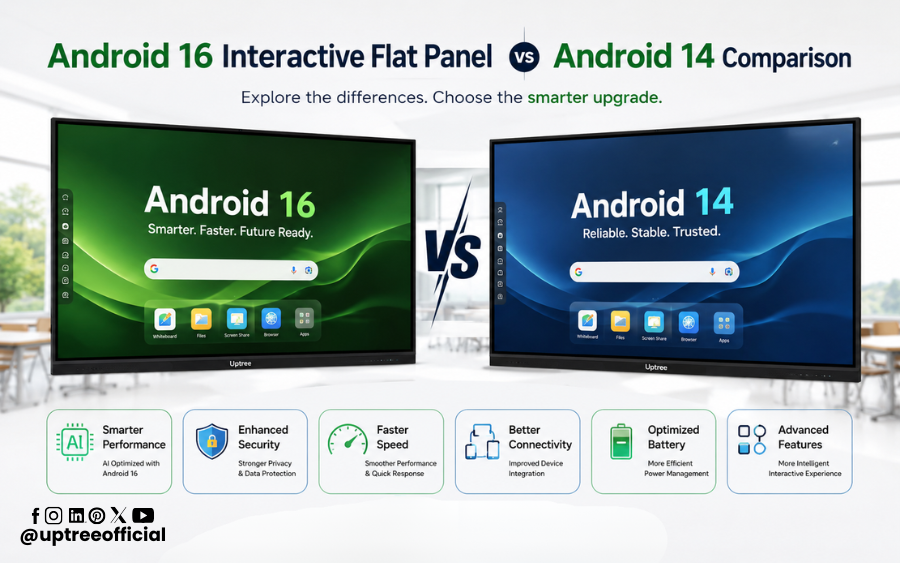
Android 16 Interactive Flat Panel vs Android 14 Comparison
Table of Contents
ToggleAndroid 16 Interactive Flat Panel vs Android 14 Comparison is one of the most searched topics among schools, colleges, coaching institutes, and businesses looking to invest in the latest interactive display technology. As interactive flat panels continue to replace traditional whiteboards and projectors, choosing the right Android version has become just as important as selecting the display itself. While Android 14 brought several improvements in performance and usability, Android 16 introduces advanced AI capabilities, enhanced security, faster processing, and a more intelligent teaching experience.
If you’re planning to purchase a new interactive flat panel, understanding the Android 16 Interactive Flat Panel vs Android 14 Comparison will help you make a smarter investment. In this comprehensive guide by Uptree, we’ll compare both versions in terms of performance, AI features, user interface, multitasking, security, collaboration, classroom productivity, and long-term value.
Whether you’re an educator, school administrator, corporate trainer, or business owner, this Android 16 Interactive Flat Panel vs Android 14 Comparison will give you a clear picture of which platform best suits your needs.
Why Android Version Matters in an Interactive Flat Panel
Many buyers focus on screen size, touch technology, speakers, or display quality when selecting an interactive flat panel. While these are essential, the Android operating system plays an equally significant role in determining how efficiently the panel performs.
An Android-powered interactive flat panel is much more than a display. It is a complete smart classroom solution capable of running educational apps, AI-powered teaching tools, cloud collaboration software, digital whiteboards, web browsers, video conferencing platforms, and multimedia applications.
This is why the Android 16 Interactive Flat Panel vs Android 14 Comparison is so important. The operating system directly affects:
- Overall system speed
- App compatibility
- AI-powered teaching tools
- Security and privacy
- Multitasking performance
- Collaboration experience
- Future software support
Choosing the latest Android version ensures your investment remains relevant for years to come.
What is an Android 14 Interactive Flat Panel?
Android 14 Interactive Flat Panels were a significant step forward compared to previous Android versions. They introduced better performance optimization, smoother touch responsiveness, improved app management, and enhanced security.
Typical Android 14 interactive flat panels include:
- 4K UHD Display
- Multi-touch support
- Wireless screen sharing
- Digital whiteboard software
- Split-screen functionality
- Cloud storage integration
- Video conferencing compatibility
- Google applications (depending on certification)
Android 14 provided educators with a stable and responsive teaching platform suitable for everyday classroom activities.
However, as educational technology evolves rapidly, many institutions now compare newer solutions through an Android 16 Interactive Flat Panel vs Android 14 Comparison before making purchasing decisions.
What is an Android 16 Interactive Flat Panel?
Android 16 Interactive Flat Panels represent the next generation of smart classroom technology.
Rather than offering only incremental improvements, Android 16 introduces several intelligent features designed to simplify teaching, improve productivity, and support AI-assisted learning.
Modern Android 16 Interactive Flat Panels include:
- AI-powered classroom tools
- Faster multitasking
- Improved system optimization
- Enhanced cloud collaboration
- Better handwriting recognition
- Advanced whiteboard features
- Improved security architecture
- Smarter app management
- Faster boot time
- Better memory utilization
When organizations evaluate the Android 16 Interactive Flat Panel vs Android 14 Comparison, these advanced capabilities often become the deciding factor.
Why More Schools Are Upgrading to Android 16
Digital classrooms are becoming more interactive every year. Teachers now rely on educational apps, AI-powered tools, online assessments, cloud-based collaboration, and multimedia lessons to keep students engaged.
Android 16 has been designed with these modern teaching requirements in mind.
Some of the biggest reasons schools are upgrading include:
Better AI Integration
Artificial Intelligence is becoming a valuable teaching assistant. Android 16 offers improved AI support for writing, content organization, search, and productivity.
Faster Performance
Teachers can switch between presentations, whiteboards, browsers, and educational apps without noticeable lag.
Enhanced Classroom Collaboration
Students and teachers can share screens, annotate documents, and collaborate more efficiently.
Improved Security
Educational institutions store sensitive student data. Android 16 introduces stronger privacy controls and better security updates.
These improvements are why the Android 16 Interactive Flat Panel vs Android 14 Comparison has become increasingly relevant for schools planning long-term technology investments.
Android 16 Interactive Flat Panel vs Android 14 Comparison: Quick Overview
Before diving into the detailed feature-by-feature analysis, here’s a quick summary.
| Feature | Android 14 | Android 16 |
|---|---|---|
| Performance | Excellent | Faster & More Optimized |
| AI Features | Limited | Advanced AI Integration |
| User Interface | Smooth | Smarter & More Responsive |
| Security | Strong | Enhanced Protection |
| App Compatibility | Excellent | Improved Future Compatibility |
| Multitasking | Good | Better Memory Management |
| Whiteboard Experience | Interactive | AI-Enhanced Interactive Experience |
| Classroom Productivity | High | Significantly Higher |
| Long-Term Updates | Good | Better Future Support |
This overview already highlights why many educators begin their buying journey with an Android 16 Interactive Flat Panel vs Android 14 Comparison.
Key Factors to Compare Before Buying
Purchasing an interactive flat panel is a long-term investment. Schools often use these displays for five to eight years or more. Therefore, comparing operating systems is just as important as comparing hardware.
Some of the major comparison points include:
1. Performance
A responsive system saves valuable teaching time and reduces classroom interruptions.
2. Artificial Intelligence
AI-powered tools improve lesson planning, content creation, and classroom engagement.
3. Security
Regular updates and enhanced protection keep educational data secure.
4. User Experience
Teachers should be able to access tools quickly without complicated navigation.
5. App Compatibility
Support for newer educational apps ensures better long-term usability.
6. Collaboration
Modern classrooms require seamless wireless sharing, annotation, and teamwork.
Each of these factors will be explored in detail throughout this Android 16 Interactive Flat Panel vs Android 14 Comparison.
Why Choose Uptree Android 16 Interactive Flat Panels?
At Uptree, we understand that technology should make teaching simpler, smarter, and more engaging. Our Android 16 Interactive Flat Panels are designed to meet the evolving needs of modern classrooms, training centers, and corporate meeting spaces.
Uptree Interactive Flat Panels offer:
- Android 16 operating system
- Stunning 4K UHD display
- Ultra-responsive multi-touch technology
- AI-powered teaching features
- Built-in digital whiteboard
- Wireless screen sharing
- Split-screen multitasking
- QR code note sharing
- Powerful speakers
- Durable anti-glare tempered glass
- Smooth collaboration for classrooms and offices
When evaluating the Android 16 Interactive Flat Panel vs Android 14 Comparison, Uptree provides a future-ready solution that combines advanced software with reliable hardware to deliver an exceptional user experience.
In the next part, we’ll dive into the detailed feature-by-feature Android 16 Interactive Flat Panel vs Android 14 Comparison, covering performance, AI capabilities, multitasking, user interface, whiteboard tools, app compatibility, and much more.
Android 16 Interactive Flat Panel vs Android 14 Comparison: Feature-by-Feature Analysis
Now that we’ve covered the basics, it’s time to explore the Android 16 Interactive Flat Panel vs Android 14 Comparison in detail. While both operating systems offer a smooth and interactive experience, Android 16 introduces several enhancements that make teaching, learning, and collaboration more efficient.
Let’s compare the most important aspects one by one.
1. Performance and Speed
Performance is one of the first things users notice when working with an interactive flat panel. Teachers often switch between presentations, whiteboards, videos, browsers, and educational apps during a single lesson. A faster operating system ensures a seamless experience.
Android 14
Android 14 provides reliable performance for everyday classroom activities. It handles common educational applications smoothly and offers stable multitasking for most users.
Highlights:
- Fast application launching
- Stable system performance
- Good memory optimization
- Smooth touch response
Android 16
Android 16 takes performance a step further with better resource management and improved system optimization. Apps open faster, switching between tasks feels more responsive, and overall system performance is smoother, even during intensive classroom sessions.
Highlights:
- Faster boot time
- Improved RAM management
- Better CPU optimization
- Reduced application loading time
- Smoother multitasking
Winner: Android 16
The Android 16 Interactive Flat Panel vs Android 14 Comparison clearly shows that Android 16 delivers a faster and more responsive experience.
2. Artificial Intelligence (AI) Features
Artificial Intelligence is transforming digital classrooms by helping teachers save time and improve lesson delivery.
Android 14
Android 14 supports AI-based applications available through third-party software but offers limited native AI enhancements.
Android 16
Android 16 introduces deeper AI integration, making everyday teaching tasks easier.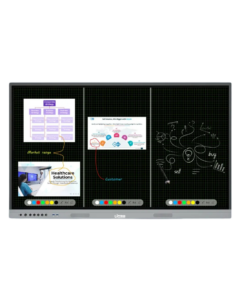
Examples include:
- Intelligent handwriting recognition
- Smart content suggestions
- AI-assisted note organization
- Faster document search
- Improved voice recognition
- Smarter classroom workflows
Teachers can prepare lessons faster and interact with students more efficiently.
Winner: Android 16
This is one of the biggest highlights in the Android 16 Interactive Flat Panel vs Android 14 Comparison, especially for institutions adopting AI-powered education.
3. User Interface and Navigation
A clean and intuitive interface allows teachers to focus on teaching rather than navigating menus.
Android 14
Android 14 introduced a refined interface with better layouts and smoother navigation than earlier Android versions.
Android 16
Android 16 enhances the experience further by offering:
- Faster navigation
- Improved animations
- Better accessibility
- Cleaner interface
- More customizable settings
- Smarter quick-access controls
Teachers can access frequently used tools with fewer steps, reducing interruptions during lessons.
Winner: Android 16
The Android 16 Interactive Flat Panel vs Android 14 Comparison demonstrates how Android 16 improves the overall user experience through thoughtful interface enhancements.
4. Whiteboard Experience
The digital whiteboard is the heart of every interactive flat panel.
Android 14
Android 14 provides a feature-rich whiteboard with:
- Multiple pen colors
- Shape tools
- Eraser
- Screenshot options
- Annotation tools
- Multi-user writing
These features are suitable for most classroom activities.
Android 16
Android 16 builds on this foundation with additional intelligent capabilities.
Teachers benefit from:
- Faster pen response
- Smoother handwriting
- Better palm rejection
- Improved object recognition
- Enhanced annotation tools
- More responsive touch performance
The writing experience feels more natural, making digital teaching even more effective.
Winner: Android 16
This enhancement makes the Android 16 Interactive Flat Panel vs Android 14 Comparison particularly valuable for educators who use the whiteboard extensively.
5. Multitasking Capabilities
Modern classrooms require teachers to run multiple applications simultaneously.
For example:
- Whiteboard
- Browser
- YouTube
- PDF reader
- Presentation
- Video conferencing software
Android 14
Android 14 supports split-screen functionality and manages multiple applications efficiently.
Android 16
Android 16 introduces smarter multitasking with:
- Better memory allocation
- Faster app switching
- Improved background process management
- Reduced lag during heavy workloads
- More efficient resource utilization
Teachers can move between different teaching tools without slowing down the system.
Winner: Android 16
The Android 16 Interactive Flat Panel vs Android 14 Comparison clearly favors Android 16 for multitasking performance.
6. Security and Privacy
Educational institutions store important student records, teaching materials, and administrative data. Security should never be overlooked.
Android 14
Android 14 already offers:
- Secure application permissions
- Privacy controls
- Regular security patches
- Better device management
Android 16
Android 16 strengthens security even further by introducing:
- Enhanced privacy protection
- Better permission management
- Stronger application isolation
- Improved encryption
- Advanced system-level security
Schools benefit from stronger protection against potential security threats.
Winner: Android 16
The Android 16 Interactive Flat Panel vs Android 14 Comparison shows that Android 16 is better prepared for long-term cybersecurity requirements.
7. Application Compatibility
Interactive flat panels rely heavily on educational applications.
Examples include:
- Google Classroom
- Microsoft Teams
- Zoom
- Educational learning apps
- Whiteboard software
- Office applications
Android 14
Android 14 supports a wide range of modern applications and provides excellent compatibility.
Android 16
Android 16 extends compatibility with newer APIs and future-ready application support, ensuring that upcoming educational tools run smoothly as developers adopt the latest Android features.
Institutions investing in Android 16 can expect better long-term software compatibility.
Winner: Android 16
This future-ready approach is another major advantage in the Android 16 Interactive Flat Panel vs Android 14 Comparison.
8. Wireless Collaboration
Today’s classrooms encourage active participation from both teachers and students.
Android 14
Android 14 supports:
- Wireless screen sharing
- Mobile casting
- Laptop connectivity
- Classroom collaboration
Android 16
Android 16 improves collaboration through:
- Faster wireless connections
- Lower screen-sharing latency
- Better compatibility with multiple devices
- Improved casting stability
- Smoother collaboration sessions
Students can present projects with minimal delay, creating a more interactive learning environment.
Winner: Android 16
The Android 16 Interactive Flat Panel vs Android 14 Comparison highlights Android 16 as the better option for collaborative classrooms.
9. Software Updates and Future Readiness
One of the biggest factors when purchasing technology is how well it will perform over the coming years.
Android 14
Android 14 remains a capable platform, but as newer applications and features emerge, its software lifecycle will naturally become shorter than that of newer Android versions.
Android 16
Android 16 is designed to support the latest innovations, making it a more future-ready choice for schools and organizations planning long-term investments.
Benefits include:
- Better compatibility with future apps
- Improved long-term support
- Access to newer Android features
- Enhanced productivity over time
Winner: Android 16
When considering long-term value, the Android 16 Interactive Flat Panel vs Android 14 Comparison strongly favors Android 16.
Which Interactive Flat Panel Should You Choose?
After exploring every aspect of the Android 16 Interactive Flat Panel vs Android 14 Comparison, one thing becomes clear—both operating systems are capable, but they are designed for different stages of technology adoption.
If your institution already uses Android 14 Interactive Flat Panels, they will continue to provide a reliable teaching experience for everyday classroom activities. However, if you’re planning a new purchase or upgrading your existing digital classroom infrastructure, Android 16 offers better long-term value.
The Android 16 Interactive Flat Panel vs Android 14 Comparison shows that Android 16 delivers noticeable improvements in AI-powered productivity, multitasking, system optimization, security, and future software compatibility. These enhancements help schools stay prepared for evolving educational technologies.
Why Schools Should Upgrade to Android 16
Educational technology continues to evolve rapidly. Interactive classrooms are no longer limited to digital writing—they now include AI-assisted teaching, cloud collaboration, online assessments, hybrid learning, and multimedia-rich lessons.
Based on this Android 16 Interactive Flat Panel vs Android 14 Comparison, Android 16 provides several advantages for modern institutions:
- Faster lesson delivery
- Better classroom engagement
- Improved multitasking for teachers
- Enhanced AI-powered teaching tools
- Stronger privacy and security
- Better compatibility with future educational applications
- Smoother collaboration for students and teachers
- Greater return on investment over time
For schools planning to use an interactive flat panel for the next five to eight years, Android 16 is the more future-ready choice.
Why Choose Uptree Android 16 Interactive Flat Panels?
At Uptree, we believe technology should simplify teaching while creating engaging learning experiences. Our Android 16 Interactive Flat Panels are designed with educators, trainers, and business professionals in mind.
What Makes Uptree Different?
Our interactive flat panels combine premium hardware with intelligent software to deliver exceptional performance.
Key Features Include:
- Android 16 Operating System
- Stunning 4K Ultra HD Display
- Ultra-responsive multi-touch technology
- AI-powered classroom features
- Built-in digital whiteboard
- Wireless screen sharing
- Split-screen multitasking
- QR Code note sharing
- Anti-glare toughened glass
- Powerful built-in speakers
- Smooth integration with educational applications
- Reliable performance for classrooms and meeting rooms
Throughout this Android 16 Interactive Flat Panel vs Android 14 Comparison, we’ve highlighted how software can significantly impact the user experience. Uptree ensures you benefit from both cutting-edge Android technology and high-quality hardware.
Who Should Buy an Android 16 Interactive Flat Panel?
Based on the Android 16 Interactive Flat Panel vs Android 14 Comparison, Android 16 is ideal for:
- Schools upgrading digital classrooms
- Colleges and universities
- Coaching institutes
- Training centers
- Corporate meeting rooms
- Government organizations
- Hybrid learning environments
- Educational institutions investing in long-term technology
Its advanced features make it a smart investment for organizations seeking a modern and future-ready collaboration solution.
Frequently Asked Questions (FAQs)
1. Is Android 16 better than Android 14 for Interactive Flat Panels?
Yes. As shown throughout this Android 16 Interactive Flat Panel vs Android 14 Comparison, Android 16 offers faster performance, improved AI features, enhanced security, better multitasking, and stronger future compatibility.
2. Should I upgrade from Android 14 to Android 16?
If you’re purchasing a new interactive flat panel or planning a technology upgrade, Android 16 is the recommended choice because it provides a more advanced and future-ready platform.
3. Does Android 16 improve classroom productivity?
Yes. Android 16 helps teachers work more efficiently with smoother navigation, intelligent tools, faster app switching, and better collaboration capabilities.
4. Which version is better for schools?
According to this Android 16 Interactive Flat Panel vs Android 14 Comparison, Android 16 is the better option for schools looking to adopt modern teaching methods and AI-assisted learning.
5. Why choose Uptree Interactive Flat Panels?
Uptree offers Android 16 Interactive Flat Panels with premium hardware, 4K UHD displays, responsive touch technology, AI-powered features, and dependable support, making them an excellent choice for educational and professional environments.
Final Verdict
After completing this Android 16 Interactive Flat Panel vs Android 14 Comparison, the conclusion is straightforward.
Android 14 remains a dependable operating system for interactive flat panels, offering stable performance and the essential features required for digital teaching. However, Android 16 raises the standard with meaningful improvements in speed, AI integration, multitasking, security, and overall user experience.
If your goal is to invest in a solution that supports evolving classroom needs, delivers long-term software compatibility, and enhances collaboration, Android 16 is the stronger choice.
At Uptree, we’re committed to helping schools, colleges, coaching institutes, and businesses embrace smarter learning and collaboration. Our Android 16 Interactive Flat Panels are built to provide a seamless experience, empowering educators and teams with the latest technology.
If you’re planning to upgrade your classrooms or training spaces, Uptree is your trusted partner. Our Android 16 Interactive Flat Panels combine advanced AI capabilities with premium performance to create an engaging, future-ready learning environment.
To learn more about the Uptree Interactive Flat Panel, explore our related blogs:
-
Top 5 Benefits of Android 16 Interactive Flat Panel: Read More
-
Android 16 Interactive Flat Panel for Modern Classrooms: Read More
-
Key Advantages of EDLA-Certified Android 16 IFP: Read More