
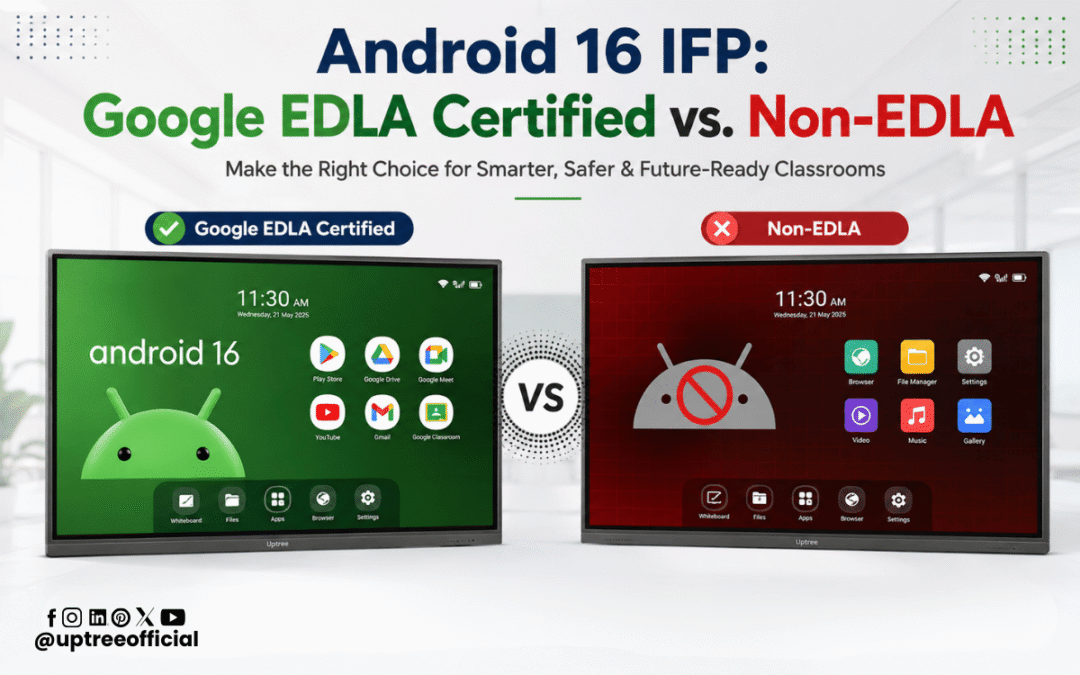
Android 16 IFP: Google EDLA Certified vs. Non-EDLA
Android 16 IFP: Google EDLA Certified vs. Non-EDLA is an important comparison for schools, colleges, coaching institutes, corporate offices, and other organizations planning to upgrade their display technology. On the surface, two interactive flat panels running Android 16 may look almost identical. Both can offer a large touchscreen, 4K display, multi-touch functionality, wireless connectivity, and interactive teaching tools. However, the real difference can be found in the software ecosystem, Google services, security, application compatibility, updates, and the overall user experience. This is where Google EDLA certification becomes an important consideration.
What Is an Android 16 Interactive Flat Panel?
An Interactive Flat Panel, commonly called an IFP, is a large touchscreen display designed to replace traditional projectors, whiteboards, and conventional displays. With Android 16, these panels can provide a modern operating environment for educational and professional applications.
An Android 16 IFP can be used for digital teaching, presentations, video conferencing, brainstorming, content sharing, online learning, and much more. Teachers can write directly on the screen, open applications, display multimedia content, connect external devices, and interact with digital learning resources.
But Android 16 alone does not tell the complete story.
Two panels can run the same Android version while offering very different experiences. One may provide a complete Google ecosystem through EDLA certification, while another may run Android without the same level of Google integration.
That is why Android 16 IFP: Google EDLA Certified vs. Non-EDLA has become a relevant topic when selecting an interactive display.
What Is Google EDLA?
Google EDLA stands for Enterprise Devices Licensing Agreement. It is Google’s licensing framework for eligible large-screen devices that want to offer Google Mobile Services and the Google ecosystem in an enterprise-oriented environment.
For an interactive flat panel, Google EDLA certification can mean access to important Google services and applications, depending on the certified device configuration and licensing.
This can include services such as Google Play Store and other Google applications. The exact applications and functionality can depend on the device and its certification.
The key point is simple: Android and Google-certified Android are not necessarily the same experience.
When comparing Android 16 IFP: Google EDLA Certified vs. Non-EDLA, buyers should therefore look beyond the Android version printed on the specification sheet.
Google EDLA Certified Android 16 IFP vs. Non-EDLA IFP
At first glance, both products may appear similar.
Both may have:
- Android 16
- 4K UHD resolution
- Large touchscreen displays
- Multi-touch support
- Built-in speakers
- Wi-Fi and Bluetooth
- HDMI and USB connectivity
- Whiteboarding software
- Screen-sharing capabilities
- Application support
So, why should you care about EDLA?
The answer lies in the ecosystem surrounding the operating system.
A non-EDLA Android panel can still be useful and may support many applications. However, the way applications are installed, updated, managed, and integrated with Google services can be different.
A Google EDLA-certified panel is designed to provide a more complete and controlled Google ecosystem.
For organizations planning to use an IFP for several years, this distinction can become more important than it initially appears.
1. Google Play Store Access
One of the most noticeable differences in Android 16 IFP: Google EDLA Certified vs. Non-EDLA is the Google Play ecosystem.
A Google EDLA-certified panel can provide access to Google Play services and the Play Store as part of its licensed configuration.
This makes it easier for users to find and install supported applications through a familiar platform.
For teachers, this can be particularly convenient. Instead of depending entirely on pre-installed applications or alternative methods of installing software, users can work within a recognized Google ecosystem.
Non-EDLA panels may have their own app stores or support APK installation, but the experience can be different from having an officially integrated Google Play environment.
2. Better Google Ecosystem Integration
Google services are now deeply integrated into many education and business workflows.
Schools may use Google Workspace, Google Drive, Google Meet, Google Classroom, YouTube, and other services for daily activities.
A Google EDLA-certified Android 16 panel can make this ecosystem easier to access, subject to the device’s licensed configuration and supported applications.
This can help teachers access cloud-based teaching resources directly from the panel.
For businesses, Google services can also support presentations, meetings, collaboration, and cloud-based workflows.
This is another reason why Android 16 IFP: Google EDLA Certified vs. Non-EDLA is more than a simple operating-system comparison.
3. Application Compatibility
Imagine a teacher preparing a lesson and wanting to use a particular educational application.
With a Google-integrated device, the process of finding supported applications through the Play Store can be more straightforward.
A non-EDLA Android panel may support Android applications as well, but application availability and compatibility can vary.
This does not mean every application will automatically work perfectly on an EDLA-certified panel. Apps still need to support the device and its Android environment.
However, having a recognized Google ecosystem can provide a more familiar application experience.
For institutions purchasing dozens or hundreds of panels, application compatibility can become a practical consideration.
4. Security and Device Management
Security is becoming increasingly important as interactive panels become connected devices rather than simple display screens.
Modern IFPs can connect to Wi-Fi networks, cloud services, applications, and organizational systems.
In Android 16 IFP: Google EDLA Certified vs. Non-EDLA, security and management should therefore be part of the purchasing discussion.
Google-certified devices are built around Google’s requirements for eligible devices and services. Organizations should still evaluate the manufacturer’s security implementation, update policy, device-management capabilities, and administrative controls.
For schools and businesses, it is important to ask:
- How are software updates delivered?
- How is the device managed?
- Can administrators control applications?
- What security features are available?
- How is user data handled?
- How frequently does the manufacturer provide firmware updates?
These questions are often more valuable than simply asking which Android version the panel uses.
5. Software Updates and Long-Term Usability
Buying an interactive panel is generally a long-term investment.
A school may expect an IFP to remain useful for several years. Businesses also want equipment that does not become outdated quickly.
This makes software support an important part of Android 16 IFP: Google EDLA Certified vs. Non-EDLA.
EDLA certification itself should not be treated as a guarantee of a particular number of future updates. Buyers should check the manufacturer’s actual update and support policy.
A good IFP manufacturer should be able to explain how software updates, security updates, firmware upgrades, and technical support are handled.
At Uptree, we believe that the value of an interactive panel should not end after installation. The complete experience includes hardware, software, support, and usability.
6. User Experience
Technology should make teaching and communication easier, not more complicated.
A panel can have excellent hardware specifications but still feel difficult to use if the software experience is confusing.
The Google ecosystem can be familiar to users who already use Android smartphones, Google applications, and Google Workspace.
That familiarity can reduce the learning curve.
Teachers can focus on teaching instead of spending unnecessary time figuring out how to access applications or cloud services.
This is one of the practical advantages worth considering when evaluating Android 16 IFP: Google EDLA Certified vs. Non-EDLA.
7. Cloud-Based Learning and Collaboration
Modern classrooms are no longer limited to textbooks and physical boards.
Teachers increasingly use cloud-based documents, online videos, digital learning platforms, virtual meetings, and collaborative applications.
An EDLA-certified Android 16 IFP can fit naturally into workflows that depend on Google’s ecosystem.
Students can interact with multimedia content, teachers can access online resources, and organizations can use cloud applications for presentations and collaboration.
For businesses, the same concept applies to meeting rooms and conference spaces.
An interactive panel can become a central collaboration device instead of functioning only as a screen.
8. Why Non-EDLA Panels Still Have a Place
It is important to make a fair comparison.
Non-EDLA does not automatically mean bad.
A non-EDLA IFP can still provide excellent hardware, interactive features, a good display, useful whiteboard software, screen sharing, and strong performance.
For some buyers, the available applications and workflow may be completely sufficient.
The important thing is to understand what you are purchasing.
If an organization does not require Google Play services or Google’s ecosystem, a non-EDLA panel may meet its requirements.
However, if Google applications and a familiar Google environment are important to the organization, EDLA certification becomes more relevant.
Therefore, the right choice in Android 16 IFP: Google EDLA Certified vs. Non-EDLA depends on the user’s actual requirements.
9. Hardware Is Still Important
EDLA should not be the only factor used to select an interactive flat panel.
A certified panel with poor hardware may not deliver a great experience.
Before purchasing, organizations should also consider:
- Display resolution
- Screen size
- Touch accuracy
- Number of touch points
- Processor
- RAM
- Internal storage
- Speaker quality
- Camera and microphone capabilities
- Connectivity options
- Anti-glare protection
- Eye-comfort features
- Build quality
- Warranty
- After-sales support
The best product is one that combines a strong hardware platform with the right software ecosystem.
This is why our approach at Uptree focuses on delivering technology designed around practical classroom and workplace requirements.
10. Which One Should You Choose?
The final decision in Android 16 IFP: Google EDLA Certified vs. Non-EDLA should depend on how you plan to use the panel.
Choose a Google EDLA-certified Android 16 IFP if:
- You want access to the Google ecosystem.
- Google Play applications are important to you.
- Your organization already uses Google services.
- You want a familiar Android-based experience.
- You want a panel suitable for modern digital classrooms.
- You expect users to install and use multiple applications.
- Cloud-based collaboration is part of your workflow.
A non-EDLA panel may be suitable if:
- You have limited application requirements.
- You primarily need whiteboarding and presentation functions.
- Your organization uses alternative application ecosystems.
- Google services are not an important part of your workflow.
- You have evaluated the available software and found it sufficient.
The decision should always be based on actual requirements rather than the certification label alone.
Android 16 Is Only One Part of the Story
One common mistake when purchasing an IFP is focusing heavily on the Android version.
Android 16 is certainly an important feature. It can provide a modern operating environment and support advanced applications and functions.
But the operating system is only one part of the complete experience.
The display, processor, RAM, storage, touch technology, software, application ecosystem, security, updates, connectivity, and after-sales support all contribute to the overall value.
This is the bigger lesson behind Android 16 IFP: Google EDLA Certified vs. Non-EDLA.
Do not simply ask, “Does it have Android 16?”
Ask, “What can I actually do with this Android 16 panel?”
Why Google EDLA Matters for Digital Classrooms
The modern classroom is becoming increasingly connected.
Teachers want to access digital content quickly. Students expect interactive learning experiences. Schools want technology that can work with their existing digital infrastructure.
In this environment, having access to a familiar application ecosystem can make a meaningful difference.
A Google EDLA-certified Android 16 IFP can bring together interactive hardware and Google’s ecosystem in a way that supports these modern workflows.
For schools investing in digital classrooms, this can make the panel more than just an interactive whiteboard. It can become a central digital learning platform.
Why Choose Uptree?
At Uptree, we understand that educational technology should solve real classroom problems.
Our Interactive Flat Panels are designed to support modern digital learning with features such as high-resolution displays, multi-touch interaction, interactive whiteboarding, multimedia learning, and smart classroom connectivity.
We also understand that every school and organization has different requirements.
Some institutions may prioritize Google services and application access, while others may focus more on content delivery, presentations, collaboration, or centralized device deployment.
That is why our team can help organizations evaluate their requirements before selecting the right configuration.
The goal is not simply to sell an interactive panel. The goal is to create a technology setup that teachers, students, and organizations can actually use comfortably every day.
Final Thoughts
Android 16 IFP: Google EDLA Certified vs. Non-EDLA is ultimately a comparison between two different approaches to using Android on an interactive display.
A non-EDLA panel can be a practical solution for organizations with straightforward requirements. However, a Google EDLA-certified Android 16 IFP can offer a more integrated Google experience, making it particularly attractive for schools, businesses, and institutions that depend on Google applications and cloud services.
The right choice depends on your application needs, software ecosystem, security requirements, budget, hardware specifications, and long-term support expectations.
Before making a purchase, do not compare panels only by screen size, Android version, or price. Look at the complete experience.
Android 16 IFP: Google EDLA Certified vs. Non-EDLA is ultimately about choosing the ecosystem that fits your organization.
For organizations looking to build smarter, more connected, and interactive learning or meeting environments, choosing the right IFP can make a significant difference.
With the right combination of hardware, software, Google ecosystem integration, interactive tools, and professional support, an interactive flat panel can become a valuable part of the modern digital environment.
Explore Uptree Interactive Flat Panels and discover a smarter way to teach, collaborate, and present.
To learn more about the Uptree Interactive Flat Panel, explore our related blogs:
-
Top 5 Benefits of Android 16 Interactive Flat Panel: Read More
-
Android 16 Interactive Flat Panel for Modern Classrooms: Read More
-
Key Advantages of EDLA-Certified Android 16 IFP: Read More