
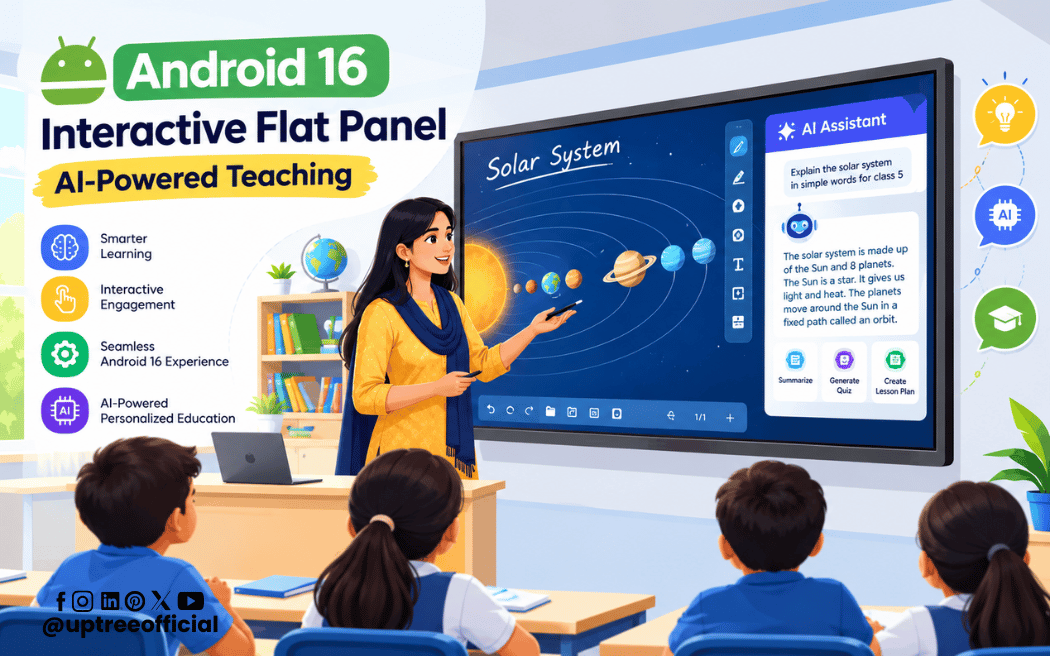
Android 16 Interactive Flat Panel: AI-Powered Teaching
Android 16 Interactive Flat Panel: AI-Powered Teaching is changing how modern classrooms use technology. Earlier interactive panels focused mainly on touch interaction, digital whiteboarding, multimedia, presentations, and educational applications. With newer AI-enabled solutions, teaching can become more intelligent, interactive, efficient, and personalized. The Android 16 Interactive Flat Panel: AI-Powered Teaching approach brings intelligent tools directly into the classroom environment, helping teachers create engaging lessons while giving students a more interactive way to learn.
The Evolution from Android 14 to Android 16
Interactive flat panels have already transformed conventional classrooms by replacing traditional boards and projectors with large touchscreen displays. Android 14-based panels offered features such as digital whiteboarding, screen sharing, applications, multimedia playback, and internet connectivity. However, AI was not inherently integrated into Android 14 simply because the panel used that operating system.
The Android 16 Interactive Flat Panel: AI-Powered Teaching concept represents a different approach. With compatible hardware and integrated AI software, artificial intelligence can become part of the everyday teaching workflow rather than being an external application.
This difference can be especially important for schools looking to modernize their digital classrooms. Instead of using an interactive panel only as a large display, teachers can use an AI-enabled panel as an intelligent classroom assistant.
How AI Changes Teaching
The biggest advantage of the Android 16 Interactive Flat Panel: AI-Powered Teaching experience is that it can help teachers use technology more intelligently.
Traditional digital teaching often requires teachers to prepare content separately, search for images on another device, connect a laptop, open multiple applications, and switch between different tools during a lesson. AI-enabled interactive panels can bring many of these activities closer together.
With an Android 16 Interactive Flat Panel: AI-Powered Teaching solution, teachers can benefit from intelligent search, smart writing tools, digital content assistance, visual learning resources, interactive applications, and other AI-supported features, depending on the panel’s configuration.
The goal is not to replace the teacher. Instead, AI acts as a supporting layer that can reduce repetitive tasks and help teachers focus more on explaining concepts and engaging students.
1. Smarter Lesson Preparation
Lesson preparation can take significant time. Teachers often need presentations, diagrams, examples, images, activities, and questions before entering a classroom.
An Android 16 Interactive Flat Panel: AI-Powered Teaching solution can make this process more efficient by bringing intelligent tools into the teaching environment.
Teachers can search for relevant visual material, organize information, prepare supporting content, and use smart tools during lessons. This can reduce the time spent moving between separate devices and applications.
For example, a science teacher explaining the human digestive system can use images, diagrams, videos, and interactive content from the panel. Instead of spending valuable classroom time searching manually, intelligent tools can help bring useful resources into the lesson more efficiently.
2. AI-Powered Content Discovery
Visual content can make difficult topics easier to understand. However, finding the right image or educational reference during a live lesson can sometimes interrupt the teaching flow.
The Android 16 Interactive Flat Panel: AI-Powered Teaching approach can make content discovery faster with intelligent search capabilities.
AI-supported image search can help teachers find relevant visuals for history, science, geography, mathematics, language learning, and other subjects. Teachers can then use those visuals directly on the large interactive display.
This creates a smoother learning experience because students can see concepts instead of relying only on verbal explanations.
3. Smart Writing and Digital Whiteboarding
Digital whiteboarding has become one of the most useful features of interactive flat panels. Teachers can write, draw diagrams, solve equations, highlight important information, and annotate presentations.
The Android 16 Interactive Flat Panel: AI-Powered Teaching experience can make digital writing smarter by adding intelligent support to the traditional whiteboard workflow.
Teachers can continue writing naturally with a stylus or their fingers while using smart features to organize or present their ideas more effectively.
This is particularly useful in mathematics, science, engineering, and other subjects where writing and diagrams are essential to understanding.
4. More Interactive Student Participation
A classroom becomes more engaging when students are active participants rather than passive viewers.
The Android 16 Interactive Flat Panel: AI-Powered Teaching model allows students to interact directly with learning content. They can solve problems, interact with diagrams, explore digital activities, participate in quizzes, annotate content, and collaborate with classmates.
Touch interaction makes learning more physical and visual. Instead of simply watching a presentation, students can interact with the lesson itself.
This can help create a classroom environment where students ask more questions, explore ideas, and become more involved in the learning process.
5. Personalized Learning
Every student learns at a different pace. Some students understand a concept quickly, while others need additional examples or simpler explanations.
The Android 16 Interactive Flat Panel: AI-Powered Teaching approach can support more flexible teaching by helping teachers present information in different ways.
A complex topic can be explained with simple visuals for beginners and deeper examples for advanced learners. Teachers can also use different forms of content, including diagrams, images, videos, simulations, and interactive exercises.
AI does not replace personalized teaching. Instead, it can give educators more tools to create personalized learning experiences.
6. Better Visual Learning
One of the main advantages of an interactive flat panel is its large, high-resolution display. When this is combined with intelligent software, classrooms can become even more visual and immersive.
An Android 16 Interactive Flat Panel: AI-Powered Teaching system can support high-resolution images, videos, charts, diagrams, educational applications, digital notes, and interactive simulations.
In science, students can explore structures and processes visually. In geography, maps can be displayed and annotated. In mathematics, graphs and shapes can be manipulated directly. In history, timelines and historical images can make lessons more engaging.
Visual learning makes it easier to explain concepts that are difficult to understand through text alone.
7. Faster Classroom Workflow
Teachers should spend more time teaching and less time managing technology.
The Android 16 Interactive Flat Panel: AI-Powered Teaching solution can bring many classroom functions into a single device. Teachers can display content, write notes, access applications, search for resources, play videos, and interact with digital material from the panel.
This can reduce unnecessary switching between laptops, projectors, tablets, and other devices.
A streamlined workflow also means fewer classroom interruptions. The teacher can maintain the flow of the lesson while using technology naturally.
8. AI as a Teaching Assistant
The most interesting aspect of the Android 16 Interactive Flat Panel: AI-Powered Teaching experience is the possibility of using AI like a classroom assistant.
Teachers can use AI-supported tools to find information, support explanations, create visual references, improve written content, and make lessons more interactive.
For example, during a geography lesson, a teacher may need a visual explanation of a particular region. During a science class, the teacher may need a diagram or additional explanation. During a language class, the teacher may want supporting vocabulary or visual examples.
Instead of leaving the classroom environment to search for resources on another device, intelligent tools can help teachers access useful material within the interactive ecosystem.
9. Android 16 vs Android 14 for Smart Classrooms
The comparison between Android 14 and Android 16 becomes especially interesting when AI integration is considered.
Android 14 interactive panels can provide excellent interactive functionality, including touchscreen operation, applications, whiteboarding, multimedia, and screen sharing. However, AI is not automatically integrated simply because a device uses Android 14.
An Android 16 Interactive Flat Panel: AI-Powered Teaching solution can be designed with AI capabilities integrated into the panel experience.
This means the real difference is not only the Android version. It is how the newer operating system works with the panel’s processor, software, AI tools, memory, storage, and educational applications.
For schools purchasing new technology, looking at the complete solution is therefore more important than focusing on the operating system alone.
10. AI Can Save Teacher Time
Teachers have many responsibilities beyond classroom instruction. Preparing lessons, finding educational resources, creating activities, and managing digital content can consume considerable time.
The Android 16 Interactive Flat Panel: AI-Powered Teaching model can help reduce repetitive work through intelligent features.
AI-enabled tools can assist with content discovery, visual search, writing, organization, and classroom presentation. This gives teachers more time to focus on student interaction, explanations, discussions, and feedback.
Technology becomes truly useful when it saves time instead of creating another process for teachers to manage.
Android 16 Interactive Flat Panel: AI-Powered Teaching for Different Subjects
The benefits of the Android 16 Interactive Flat Panel: AI-Powered Teaching concept are not limited to one subject.
Mathematics
Teachers can use interactive equations, graphs, geometric shapes, digital writing, and visual problem-solving activities.
Science
Diagrams, simulations, images, videos, and interactive models can make complex scientific concepts easier to understand.
Geography
Maps, satellite visuals, charts, and location-based content can help students connect classroom learning with the real world.
History
Historical photographs, timelines, maps, documents, and multimedia can make lessons more informative and engaging.
Languages
Teachers can combine text, images, writing exercises, audio, videos, and interactive activities to improve language learning.
Computer Science
Digital applications, coding demonstrations, diagrams, and interactive software can help students understand technical subjects more effectively.
This flexibility makes the Android 16 Interactive Flat Panel: AI-Powered Teaching approach suitable for schools across different grades and curriculum areas.
Why Schools Should Choose an AI-Ready Interactive Panel
Schools making technology investments today need to think about long-term value. A panel should not only solve today’s classroom requirements but also support future teaching methods.
The Android 16 Interactive Flat Panel: AI-Powered Teaching approach can provide a more future-focused platform by combining interactive display technology with intelligent software capabilities.
When selecting a panel, schools should evaluate display quality, processor performance, RAM, storage, touch response, connectivity, operating system support, classroom software, AI functionality, audio, security, reliability, and service support.
The strongest solution is one that teachers can use easily every day.
Android 16 Interactive Flat Panel: AI-Powered Teaching by Uptree
At Uptree, we believe classroom technology should make teaching simpler, smarter, and more engaging.
Our vision for the Android 16 Interactive Flat Panel: AI-Powered Teaching experience is centered on combining powerful interactive hardware with intelligent software tools. A modern Uptree interactive flat panel can support high-resolution visuals, multi-touch interaction, digital whiteboarding, multimedia learning, classroom applications, and AI-enabled features.
The objective is not simply to install a large display in the classroom. The objective is to create an environment where teachers can interact with technology naturally, and students can participate actively.
For schools building or upgrading digital classrooms, an AI-enabled interactive flat panel can become an important part of a complete education technology ecosystem.
Key Benefits of Android 16 Interactive Flat Panel: AI-Powered Teaching
The Android 16 Interactive Flat Panel: AI-Powered Teaching approach can offer several practical advantages for modern education:
Smarter teaching: AI-supported tools can assist teachers during everyday classroom activities.
Faster content discovery: Intelligent search tools can help teachers find visual and educational resources efficiently.
Interactive learning: Students can interact directly with content through touch-based activities.
Better visualization: High-resolution displays can make diagrams, videos, maps, and simulations easier to understand.
Improved productivity: Integrated tools can reduce unnecessary switching between devices.
Flexible teaching: Teachers can adapt explanations and content for different student needs.
Future-ready classrooms: Newer AI-enabled technologies can provide a foundation for evolving digital education requirements.
Why AI Is Becoming Important in Education
AI is changing many industries, and education is no exception. Teachers are increasingly looking for technology that can help them save time, create richer content, and support student engagement.
The Android 16 Interactive Flat Panel: AI-Powered Teaching concept reflects this shift by bringing intelligent capabilities into the classroom display itself.
The classroom of the future is not simply about putting technology on a wall. It is about using technology to make learning more connected, visual, interactive, and adaptable.
When AI is integrated thoughtfully, a teacher can gain a powerful set of tools without needing to completely change the teaching process.
The Future of Interactive Classrooms
The next generation of smart classrooms will likely focus on combining interactive hardware, software, connectivity, AI, digital content, and collaboration.
The Android 16 Interactive Flat Panel: AI-Powered Teaching experience fits naturally into this direction.
Instead of using one device for display, another for writing, another for searching, and another for multimedia, teachers can increasingly expect one integrated platform to support many classroom tasks.
This can make technology more accessible and help schools build more efficient digital learning environments.
Conclusion
The Android 16 Interactive Flat Panel: AI-Powered Teaching approach represents a major step in the evolution of interactive classroom technology. Android 14-based interactive panels already offered valuable digital teaching features, but AI was not inherently integrated into Android 14. With compatible Android 16 solutions, AI can become a more central part of the teaching experience.
The Android 16 Interactive Flat Panel: AI-Powered Teaching concept can help teachers search for content faster, create more engaging explanations, use smart writing tools, support visual learning, encourage student participation, and build more personalized classroom experiences.
For schools, the decision should go beyond choosing the latest operating system. It should focus on selecting a complete interactive solution that combines powerful hardware, reliable software, useful AI tools, strong classroom functionality, and dependable support.
At Uptree, our goal is to help educational institutions move toward smarter digital classrooms with technology designed around real teaching requirements.
The future of education is becoming more interactive, intelligent, and connected. The Android 16 Interactive Flat Panel: AI-Powered Teaching experience brings these possibilities closer to today’s classroom and provides a strong foundation for the smart classrooms of tomorrow.
To learn more about the Uptree Interactive Flat Panel, explore our related blogs:
-
Top 5 Benefits of Android 16 Interactive Flat Panel: Read More
-
Android 16 Interactive Flat Panel for Modern Classrooms: Read More
-
Key Advantages of EDLA-Certified Android 16 IFP: Read More