
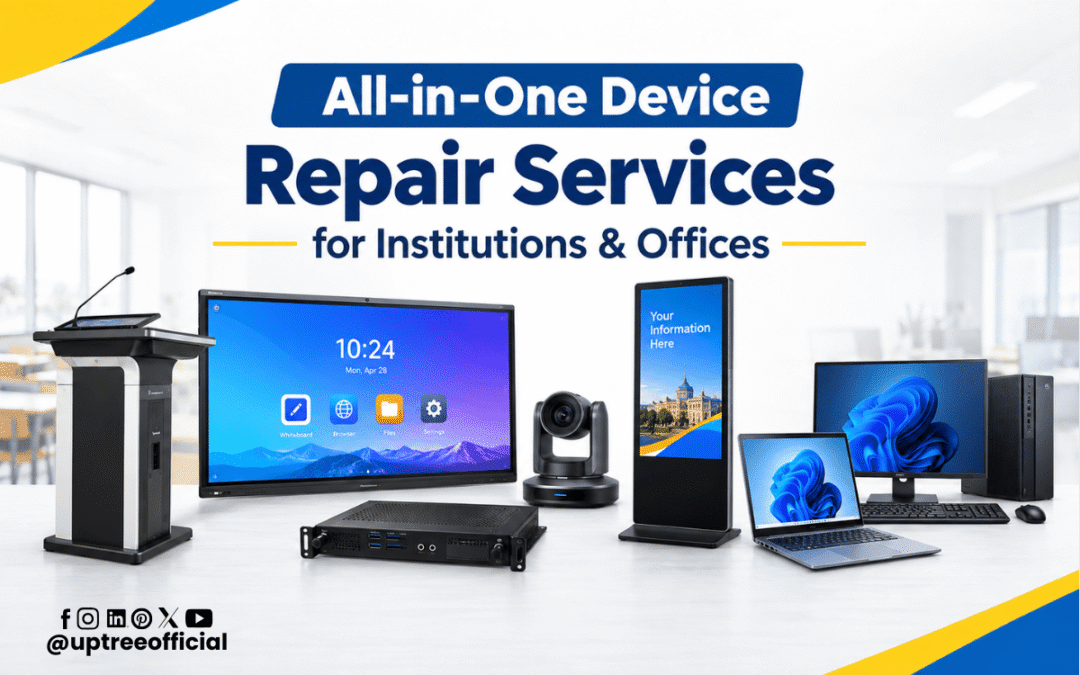
All-in-One Device Repair Services for Institutions & Offices
All-in-One Device Repair Services for Institutions & Offices are becoming increasingly important as schools, colleges, coaching institutes, businesses, and corporate offices depend on technology for their everyday operations. From Interactive Flat Panels and OPS systems to laptops, desktops, All-in-One PCs, and Digital Standees, modern workplaces use multiple digital devices to support teaching, communication, presentations, administration, and customer engagement. When any of these devices develops a technical problem, even a small issue can affect productivity and create unnecessary downtime.
Uptree understands the importance of keeping technology operational. Our All-in-One Device Repair Services for Institutions & Offices are designed to provide professional support for a wide range of devices used in educational and business environments. Uptree’s repair portfolio includes Interactive Flat Panels, Digital Standees, OPS systems, Audio Podiums, All-in-One PCs, laptops, and desktops.
Why Device Repair Services Matter for Institutions and Offices
Technology has become a regular part of institutional and corporate infrastructure. A school may use Interactive Flat Panels for classroom teaching, OPS systems for computing, Digital Standees for communication, and computers for administration. Similarly, offices may depend on laptops, desktops, All-in-One PCs, display systems, and presentation equipment.
When one device stops working properly, employees or teachers may have to change their workflow. A faulty display can interrupt a presentation, a slow computer can delay administrative work, and an OPS problem can affect an entire smart classroom.
This is why All-in-One Device Repair Services for Institutions & Offices should focus not only on fixing individual faults but also on restoring reliable performance as quickly as possible.
Professional repair support can help organizations:
- Reduce unnecessary device downtime
- Restore important equipment to working condition
- Identify hardware and software problems
- Improve device performance
- Extend the useful life of equipment
- Reduce the need for premature replacement
- Maintain smoother day-to-day operations
Comprehensive Device Repair Under One Roof
One of the biggest advantages of All-in-One Device Repair Services for Institutions & Offices is convenience. Instead of contacting different service providers for different types of equipment, institutions and businesses can work with a single professional repair partner.
Uptree provides repair support for several categories of devices. The company’s repair-services page specifically covers Interactive Flat Panels, Digital Standees, OPS systems, Audio Podiums, All-in-One PCs, laptops, and desktops.
This approach is particularly useful for organizations that operate multiple classrooms, departments, branches, offices, training rooms, or meeting spaces.
Interactive Flat Panel Repair Services
Interactive Flat Panels are an important part of modern digital classrooms, training rooms, meeting rooms, and presentation environments. A technical issue with an IFP can affect teaching, presentations, collaboration, and communication.
Uptree’s All-in-One Device Repair Services for Institutions & Offices include support for common Interactive Flat Panel problems such as touch issues, display problems, motherboard faults, power failures, software glitches, and connectivity errors.
Professional diagnosis is important because an IFP combines several components into one system. A display problem may have a different cause from a touch problem, while connectivity issues may involve ports, cables, software, or internal components.
Proper repair can help restore:
- Display clarity
- Touch responsiveness
- System stability
- Connectivity
- Power operation
- Overall device performance
For schools and colleges using multiple Interactive Flat Panels, dependable repair support can help minimize interruptions to digital learning.
OPS System Repair Services
An OPS system provides computing functionality for compatible Interactive Flat Panels and digital display environments. When an OPS system experiences a problem, the connected display may not provide the expected computing experience.
Uptree handles OPS-related issues including boot failures, motherboard faults, RAM and SSD problems, overheating, power issues, and operating-system errors.
All-in-One Device Repair Services for Institutions & Offices can therefore be especially useful for organizations where IFP and OPS systems are used together.
A professional technician can inspect the system, identify the faulty component or software issue, and recommend an appropriate repair solution. This helps institutions avoid replacing an entire setup when the problem may be limited to a particular component.
Digital Standee Repair Services
Digital Standees are widely used for advertising, information displays, reception areas, promotions, announcements, and visual communication. A Digital Standee that suddenly stops working can affect an organization’s communication and promotional activities.
Uptree’s Digital Standee repair support covers problems such as screen damage, display flickering, power issues, motherboard faults, and software errors.
Through All-in-One Device Repair Services for Institutions & Offices, organizations can seek professional assistance for display-related problems instead of immediately replacing the complete unit.
Repair support can help restore clear visuals, stable operation, and normal functionality while reducing unnecessary downtime.
All-in-One PC Repair Services
All-in-One PCs are popular in offices, educational institutions, reception areas, laboratories, administrative departments, and business environments because the computer components are integrated into a single system.
However, like any computer, an All-in-One PC can develop hardware or software problems. Uptree’s repair services address issues including display faults, motherboard problems, slow performance, overheating, power failures, RAM and storage problems, and operating-system errors.
All-in-One Device Repair Services for Institutions & Offices can help organizations keep these systems operational without immediately investing in replacement equipment.
A proper diagnosis can determine whether the problem is related to memory, storage, power, display, motherboard components, software, or another internal issue.
Laptop Repair Services
Laptops are essential for teachers, administrators, managers, employees, students, trainers, and business professionals. They are commonly used for documentation, presentations, online meetings, communication, data management, research, and other daily tasks.
Uptree provides laptop repair support for issues such as screen damage, motherboard faults, slow performance, overheating, battery failures, RAM and storage problems, keyboard issues, and operating-system errors.
Including laptops within All-in-One Device Repair Services for Institutions & Offices gives organizations a convenient way to manage their technology repair requirements through one service provider.
Desktop Repair Services
Desktop computers continue to play an important role in offices, computer labs, educational institutions, reception areas, accounting departments, and administrative environments.
Uptree’s desktop repair services cover motherboard faults, slow performance, overheating, power failures, RAM and storage problems, graphics-related issues, and operating-system errors.
With All-in-One Device Repair Services for Institutions & Offices, organizations can address desktop problems through professional diagnosis and repair rather than relying on temporary fixes.
Common Reasons Devices Need Repair
Electronic devices can experience problems for many different reasons. Some issues develop gradually while others occur suddenly.
Common causes include:
1. Regular Wear and Tear
Devices used every day for long hours can experience component wear over time. Regular usage may eventually affect batteries, storage devices, cooling systems, ports, displays, and other components.
2. Power-Related Problems
Voltage fluctuations, power failures, unsuitable adapters, or electrical issues can cause devices to malfunction.
3. Overheating
Blocked ventilation, dust accumulation, heavy workloads, or cooling problems can cause computers and other electronic systems to overheat.
4. Software Errors
Operating-system problems, corrupted files, incompatible software, or configuration errors can affect device performance.
5. Physical Damage
Screens, ports, keyboards, panels, and external components can be damaged through accidental impact or improper handling.
6. Connectivity Problems
Faulty cables, ports, network settings, or internal components can result in connectivity failures.
Professional All-in-One Device Repair Services for Institutions & Offices can help identify the actual cause instead of treating only the visible symptom.
Benefits of Choosing Professional Repair Services
Professional repair is different from attempting random troubleshooting. Institutions and offices often have important data, expensive equipment, and operational deadlines. Incorrect handling can create additional problems.
Reduced Downtime
Fast diagnosis and appropriate repair can help organizations restore devices to operation sooner.
Cost Efficiency
Repairing a suitable device can sometimes be more practical than immediately purchasing a replacement.
Better Diagnosis
Experienced technicians can inspect hardware and software systematically to identify the source of a problem.
Extended Device Life
Timely maintenance and repair can help organizations continue using their existing equipment effectively.
Convenient Support
A single repair partner can simplify support for multiple categories of equipment.
Support for Institutional Requirements
Schools, colleges, coaching institutes, businesses, and offices often have different operational requirements. A professional service provider can understand the importance of minimizing disruption.
On-Site Repair Support
For institutions and offices, transporting large or installed equipment to a repair center may not always be convenient. Interactive Flat Panels, Digital Standees, and other display systems can be difficult to move safely.
Uptree provides on-site repair services, allowing eligible products to be repaired at the customer’s location. The company’s repair-services page states that customers can contact its support team with product details and that on-site repair support is available.
This makes All-in-One Device Repair Services for Institutions & Offices more convenient, particularly for installed technology.
Why Choose Uptree for Device Repair?
Uptree focuses on technology solutions for education and business environments. Its repair portfolio covers multiple categories of equipment, allowing customers to seek support for several device types through one organization.
When choosing All-in-One Device Repair Services for Institutions & Offices, organizations should consider factors such as:
- Experience with the required device category
- Availability of technical support
- Quality of replacement components
- Diagnosis and troubleshooting capability
- Turnaround time
- On-site support availability
- Post-repair service assurance
- Ability to support multiple types of devices
Uptree’s repair service is designed around these practical requirements, with a focus on restoring device performance and minimizing operational disruption.
Repair Instead of Immediate Replacement
When a device develops a problem, replacement is not always the only option. Depending on the age, condition, fault, and availability of components, repair may provide a practical way to continue using existing equipment.
For organizations with multiple devices, this can be particularly important. Replacing several computers, display systems, or digital devices at the same time can require a significant budget and may also involve installation, configuration, data migration, and staff training.
All-in-One Device Repair Services for Institutions & Offices allow organizations to first understand the problem and evaluate whether repair is suitable.
The decision should be based on the actual condition of the equipment, estimated repair cost, expected remaining service life, and operational requirements.
Repair Services for Schools and Educational Institutions
Educational institutions increasingly depend on digital infrastructure. Smart classrooms, computer labs, administrative offices, training rooms, reception areas, and conference rooms may all use different technology.
A school may require Interactive Flat Panel repair in a classroom, laptop repair in an administrative department, desktop repair in a computer lab, or Digital Standee repair at the reception area.
All-in-One Device Repair Services for Institutions & Offices can simplify these requirements by providing a broader repair solution rather than treating each device as a separate service requirement.
For educational institutions, minimizing downtime is particularly important because technology problems can interrupt scheduled classes and training sessions.
Repair Services for Corporate Offices
Businesses also rely heavily on technology for daily operations. Employees may depend on laptops and desktops, while meeting rooms may use Interactive Flat Panels and other presentation equipment.
When devices fail, meetings, presentations, communication, documentation, and administrative activities can be affected.
All-in-One Device Repair Services for Institutions & Offices can provide businesses with a centralized approach to handling common device problems.
This can be useful for companies with multiple departments, branches, training rooms, meeting rooms, and technology-enabled workspaces.
A Practical Repair Process
A professional repair process generally begins with understanding the problem.
Step 1: Share Device Details
The customer provides information about the device, issue, symptoms, and usage environment.
Step 2: Technical Diagnosis
The technician examines the device to identify the likely hardware or software fault.
Step 3: Repair Recommendation
After diagnosis, the appropriate repair or replacement requirement can be determined.
Step 4: Repair and Testing
The required repair work is carried out, followed by testing to verify device operation.
Step 5: Return to Service
Once the device is functioning properly, it can be returned to regular institutional or office use.
Uptree states that repair time depends on the issue and that its technicians work to complete repairs efficiently. The company also states that its repair work comes with service assurance.
Maintenance Can Prevent Bigger Problems
Repair is important, but regular maintenance can also help identify problems before they become major failures.
Institutions and offices can improve device reliability by:
- Keeping equipment clean and properly ventilated
- Using appropriate power protection
- Avoiding unnecessary software installations
- Keeping operating systems updated
- Handling displays carefully
- Checking cables and ports regularly
- Monitoring unusual heating or noise
- Addressing performance problems early
- Scheduling professional technical inspection when required
Early attention to unusual behavior can sometimes prevent a minor issue from becoming a larger operational problem.
Why One Repair Partner Can Be More Convenient
Managing multiple service providers can become complicated when an organization has several categories of technology. One vendor may repair computers while another handles displays and another handles Digital Standees.
All-in-One Device Repair Services for Institutions & Offices provide a more centralized approach.
With Uptree, institutions and businesses can seek repair support for Interactive Flat Panels, OPS systems, Digital Standees, All-in-One PCs, laptops, desktops, and other supported products.
This can simplify communication, service coordination, and technical support for organizations with diverse technology requirements.
Conclusion
All-in-One Device Repair Services for Institutions & Offices are an important part of maintaining reliable digital infrastructure. As educational institutions and businesses continue to depend on smart displays, computers, OPS systems, Digital Standees, and other technology, professional repair support can help reduce downtime and maintain productivity.
Uptree provides a broad range of repair services covering Interactive Flat Panels, Digital Standees, OPS systems, Audio Podiums, All-in-One PCs, laptops, and desktops. Its services include technical diagnosis, repair support, and on-site assistance for suitable requirements.
For schools, colleges, coaching institutes, corporate offices, training centers, and businesses, choosing a repair partner that understands different types of technology can make device maintenance simpler and more efficient.
If a device is showing display problems, touch issues, slow performance, power failures, overheating, connectivity problems, motherboard faults, or software errors, professional diagnosis is an important first step.
With All-in-One Device Repair Services for Institutions & Offices, organizations can focus on keeping their technology operational, reducing avoidable downtime, and making better use of their existing equipment.
To learn more about the Uptree Interactive Flat Panel, explore our related blogs:
-
Top 5 Benefits of Android 16 Interactive Flat Panel: Read More
-
Android 16 Interactive Flat Panel for Modern Classrooms: Read More
-
Key Advantages of EDLA-Certified Android 16 IFP: Read More